[ guide · published 2026-08-26 · updated 2026-09-20 ]
Jira issue hierarchy and rollups explained
by Andrey Pavlov · Claused
If you have ever looked at a Jira project and wondered how epics, stories, and sub-tasks are supposed to relate — and why getting a simple total out of them is so hard — this page is the missing manual. If you only want the number, start with how to sum story points across epics in Jira and come back here for the reasoning.
The hierarchy, level by level
Jira nests work in parent–child layers. Out of the box there are three of them — Atlassian’s work type hierarchy page describes level 1 (Epic), level 0 (Story) and level −1 (Subtask), and notes that adding levels above Epic is only available on Jira Cloud Premium and Enterprise.
| Level | What it is | Typical estimate? |
|---|---|---|
| Epic (and levels above) | A large goal spanning weeks or months | Usually no — it’s a container |
| Story / Task / Bug | A concrete, deliverable piece of work | Yes — this is where story points live |
| Sub-task | A step inside one piece of work | Sometimes — by default Jira does not offer the field here |
Three details people miss:
- The hierarchy is the parent field. A story belongs to an epic because its parent is that epic; the same field ties a sub-task to its story and, on sites with levels above epics, an epic to its initiative. Issue links such as “blocks” or “relates to” express relationships, not hierarchy, and a rollup should not follow them.
- Children can live in a different project. A platform epic can have stories in three teams’ projects. Jira allows it; most reporting tools quietly ignore it.
- Containers usually carry no estimate of their own — and that is fine. An epic without points is a folder, not a data-quality problem. The default even leans this way for the bottom level: Atlassian’s story points page says story points can by default only be assigned to story or epic-type work items, not to sub-tasks.
What “rollup” actually means
A rollup walks the tree bottom-up: each level shows the total of everything underneath it. Atlassian uses the same word for roll-ups in Plans — inferring a parent’s estimate, dates, sprint or team from its children — a feature of Jira Premium and Enterprise that lives inside the plan view. The idea is the same wherever it runs.
Simple for sums. But the moment you want anything beyond a sum, the math gets specific — and this is where many tools cut corners:
Averages. The average should divide by the number of estimated issues, not all issues. If 3 of 10 issues have points, the average of those 3 is the truth; dividing by 10 pretends the other 7 are zeros.
Medians. The median of a group must come from the full list of values in that group. You cannot compute a “median of medians” — combining per-epic medians gives a statistically wrong number. A correct tool carries the whole distribution up the tree.
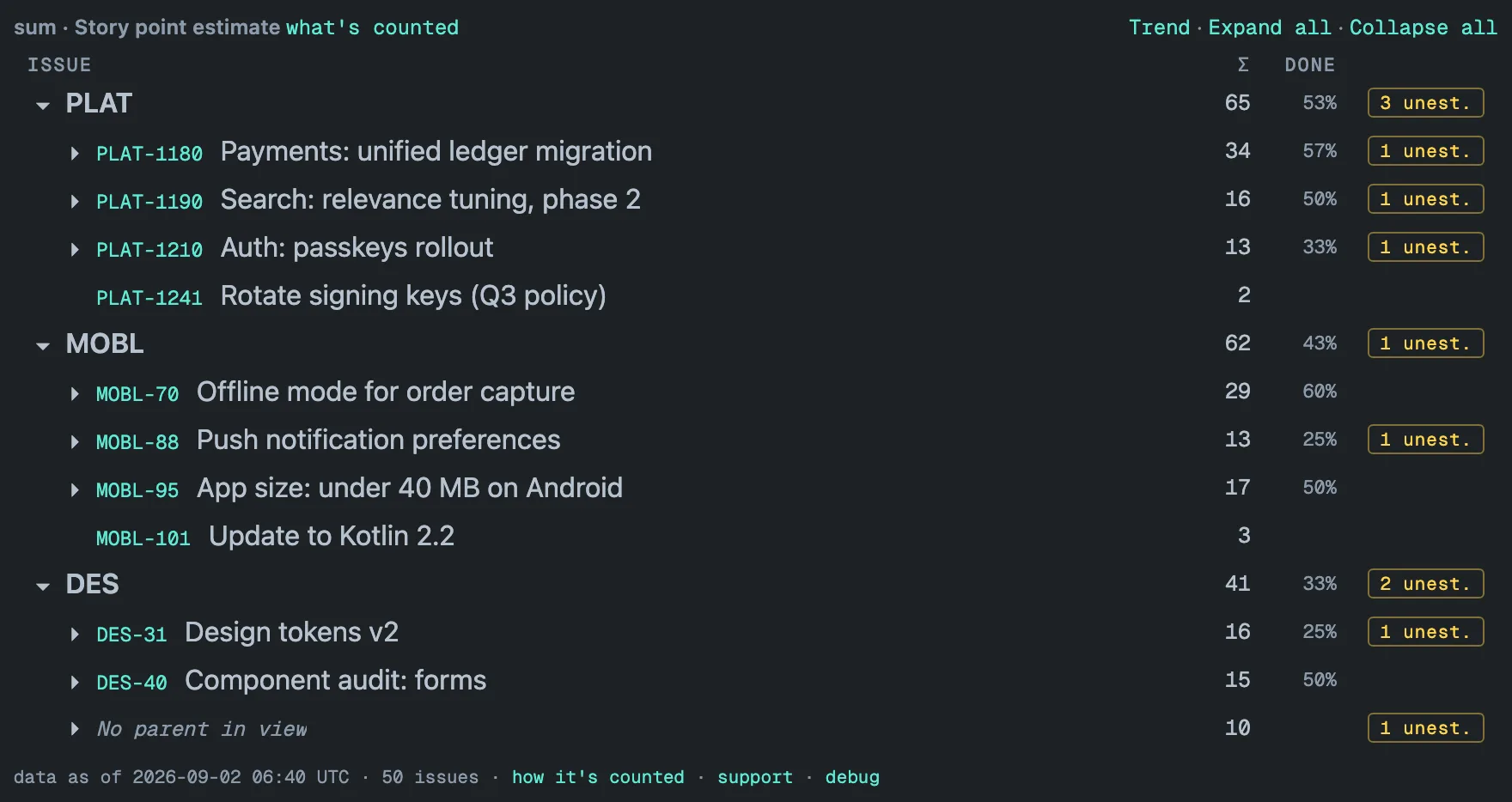
Unestimated work. Issues without points are not zeros — they are unknowns. A trustworthy rollup counts them separately (“6 unest.”) and shows you exactly which issues they are, so before sprint planning you can click straight to the work nobody has sized.
Done means status category. A rollup of remaining work must leave
finished issues out, and “finished” in Jira is a status category, not a
status name — statuses such as Cancelled or Won’t Do count as finished
too when your admin has mapped them to the Done category. Atlassian’s
note on searching by statusCategory
names the three categories and the statusCategory clause that selects
them. A parent that is itself done but still has open children should stay
in the tree as a container, or its open work disappears with it.
Messy reality. Real instances contain issues whose parents were deleted, children of epics from other projects, even circular parent chains left by old imports. A tool that silently drops or double-counts these produces confident nonsense. The options that hold up are: show them in a clearly labeled group, and say so in a diagnostics line.
Why this is hard to do fast
A real rollup across projects means reading every issue in the tree — easily tens of thousands — then computing the whole hierarchy. Doing that at the moment you open a dashboard is why so many reporting gadgets crawl on large instances. Apps built on Atlassian’s Forge platform also run against a hard 25-second limit per render, and a portfolio of tens of thousands of issues can outgrow it.
The alternative is to compute before you arrive: keep a stored copy of
the issues inside your Atlassian site, refresh it in the background — a
full re-read once a day, an hourly update in between — and let the
dashboard read a prepared result. A 31,000-issue portfolio then renders in
about a second and a half. That approach is what our gadget,
Hierarchy Totals, is built on. It follows the
parent field only, offers Open work only as exactly
statusCategory != Done while keeping a done parent with open children as
a container, and computes medians over the full distribution. The
freshness and performance doc
explains the mechanics in user terms, including exactly when data
refreshes and how the gadget tells you how fresh it is, and
how rollups work writes
down the math above as the gadget applies it.
[ questions ]
▸What are the levels of the Jira issue hierarchy?
By default there are three: Epic (level 1), the standard work items — Story, Task, Bug — at level 0, and Sub-task at level −1. Jira Premium and Enterprise sites can add levels above Epic, such as initiatives or themes, in the work type hierarchy settings. Every level is joined to the one above it by the parent field, and that field is what a rollup should follow.
▸Do issue links like "blocks" or "relates to" count as hierarchy?
No. Issue links express relationships between work items; they do not make one the parent of another, and a rollup that followed them would count the same work twice. Only the parent field defines the hierarchy. Hierarchy Totals follows the parent field alone — sub-task to story to epic and any level above — and leaves issue links out.
▸Should an epic carry its own story points?
Usually not — the epic is a container and its total should come from its children. If one does carry a value, a rollup has to say what it does with it. In a Jira plan, rolled-up estimates replace the value typed on the parent; Hierarchy Totals adds the epic's own value to its children's, and its what's counted panel shows the exact query behind the total.