[ guide · published 2026-08-26 · updated 2026-09-20 ]
How to sum story points across epics in Jira
by Andrey Pavlov · Claused
Short answer: Jira does not sum child story points into the epic on its own. Natively: board sprint totals, the epic progress bar, issue counts in Two Dimensional Filter Statistics, JQL, CSV export and Automation rules, plus Plans on Jira Premium. For hierarchy-wide, cross-project totals, a gadget such as Hierarchy Totals does the summing.
You planned a quarter of work in Jira. Now someone asks a completely reasonable question — “how many story points is all of this?” — and you discover that Jira has no obvious button for it. This guide walks through every way to get that number, in plain language, including where each approach quietly stops working.
First, the vocabulary (30 seconds)
- Story points are the numbers teams put on issues to express effort. In Jira they live in a numeric field — Story Points in company-managed projects, Story point estimate in team-managed ones. They are two different fields, which matters later.
- The hierarchy is how Jira nests work: an epic (a big goal) contains stories and tasks (concrete pieces), which can contain sub-tasks (steps). Larger setups add levels above epics. The nesting is Jira’s parent field — issue links such as “blocks” or “relates to” are not hierarchy.
- A rollup means: every level shows the total of everything underneath it. That’s the number people actually ask for.
What Jira gives you out of the box: six native ways
-
The board’s sprint totals. On a Scrum board each sprint header shows the sum of its issues’ estimates — story points, time or issue count, whichever the board is configured to use. It is per sprint, counts only what is on that one board, knows nothing about hierarchy, and leaves sub-tasks out — the sprint report counts estimates on parent work items only, never on their sub-tasks.
-
The epic progress bar. The timeline draws a bar under each epic from the status of its children, sub-tasks included. It is a status picture — how many pieces are to do, in progress and done — not a total of story points, and it is drawn inside one project’s timeline rather than on a dashboard.
-
Two Dimensional Filter Statistics gadget. A classic dashboard gadget that, in Atlassian’s words, displays tabular data based on a filter — issues by status per epic, for example. It counts issues per cell; there is no option to sum a numeric field — and a sum is exactly what you need.
-
JQL search. JQL is great at finding issues —
parent = PROJ-42, orstatusCategory != Doneto leave finished work out — but a search result in Jira Cloud shows a list, not a sum of a field. -
Export to a spreadsheet. Always works, always manual: export CSV, build a pivot table, repeat next week when the numbers change. Fine once; painful as a routine.
-
Automation rules. Atlassian ships a “Sum up story points” template that writes
{{issue.subtasks.Story Points.sum}}to the parent whenever a sub-task’s points change, and a knowledge-base rule for the epic case: look up the stories with"parent" = {{triggerIssue.parent}}and write{{lookupIssues.Story Points.sum}}into a number field on the epic. This genuinely works — with four conditions attached. The rule recalculates only when its trigger fires, so existing epics stay blank until a child changes; each rule covers one parent–child level; children in other projects need a multi-project or global rule; and every step consumes the site’s monthly automation allowance — on Jira Standard, 400 steps per user per month when we checked on 2026-09-02. The rule, step by step, and each of the places it breaks are in Sum story points to an epic with Jira Automation.
Rolling sub-tasks up to the epic
Sub-tasks sit at the bottom of the hierarchy, one level under the story. Two Jira defaults make them awkward to total. First, by default the story points field is offered on story- and epic-type work items, not on sub-tasks — an admin has to widen the field’s context before a sub-task can carry a number at all. Second, even when they do, boards and the sprint report ignore sub-task estimates. So if your team estimates at sub-task level, the native totals are wrong before you start.
To get sub-task points into the epic with Automation you chain two rules — sub-task → story with the template above, then story → epic with the lookup rule — and decide what happens when a story carries its own estimate as well: the first rule overwrites it with the sub-task sum, which is either exactly what you wanted or a silent loss of data. Fire them in the wrong order and the epic reads a stale story value for a while.
A hierarchy rollup skips the chain. It follows the parent field through every level in one pass — sub-task → story → epic → any level above — and each row shows itself plus everything below it. In Hierarchy Totals a story with sub-tasks shows their sum together with its own value, an epic that carries an estimate of its own adds it to its children’s, and an issue with no value shows a dash rather than a zero, while the amber unest. badge on the rows above it counts the leaves that still have no estimate.
Do I need Jira Premium (Plans) for this?
Only if you want Jira itself to do the rolling. Plans (formerly Advanced Roadmaps) can infer a parent’s values from its children — roll-ups of estimates, dates, sprints, teams and releases — and Atlassian’s page says plainly that these advanced planning features are only available as part of Jira Cloud Premium and Enterprise. Rolled-up estimates in a plan are dynamic (they shrink as time is logged), are rounded to one decimal place for story points, and replace any value typed on the parent. Hierarchy levels above the epic — initiatives, themes — are a Premium feature too.
Without Premium you still have Automation, within its allowance, and dashboard gadgets. Hierarchy Totals is a dashboard gadget, not a Plans feature: it reads the parent field your site already has, so it needs no Premium subscription, and on a Premium site it follows the extra levels as well. It is free on Jira sites with up to 10 users; paid tiers are billed through the Marketplace and will be published with the listing.
Count vs sum: which one you want
A count answers “how many issues”; a sum answers “how much work”.
The Two Dimensional Filter Statistics gadget and the epic progress bar
count, so a one-point bug and a thirteen-point story weigh the same. If the
question is delivery effort, you need a sum of the estimate field — and the
sum has to leave out what is finished, which in Jira means status
category, not status name: statusCategory != Done also drops statuses
such as Cancelled or Won’t Do when your admin has mapped them to the Done
category. Atlassian’s
note on searching by statusCategory
names the three categories and the clause. Counting keeps its place: “how
many issues remain under this epic” is a count, and a hierarchy-aware count
— grandchildren and sub-tasks included — is a different number from the
flat one a filter gives you.
Hierarchy Totals offers both. count sits next to sum, average, min, max
and median in the gadget’s aggregate list, its Open work only switch is
exactly statusCategory != Done, and on parent rows the DONE column shows
the share of the work under the row that is done — sub-tasks, and stories
without sub-tasks; an epic is never counted itself — so you read effort (the
Σ column) and progress (the DONE column) side by side.
Where all of this stops
Notice the pattern: each native option handles one flat slice — one sprint, one epic’s direct children, one filter, one rule per level. None of them will:
- follow the hierarchy to any depth (sub-task → story → epic → above);
- cross project boundaries (“all four teams working on this initiative”);
- keep the total truthful when some issues simply have no estimate yet.
That last point matters more than it sounds. A total that silently treats unestimated work as zero looks precise and is quietly wrong — sixty issues nobody has sized yet are unknown effort, not zero effort.
What a purpose-built rollup app does
Marketplace apps exist because this gap is real. A good one gives you, on a dashboard, a tree of your epics with totals at every level, across projects, with unestimated work counted and visible rather than hidden. This is what that looks like in our gadget, Hierarchy Totals:
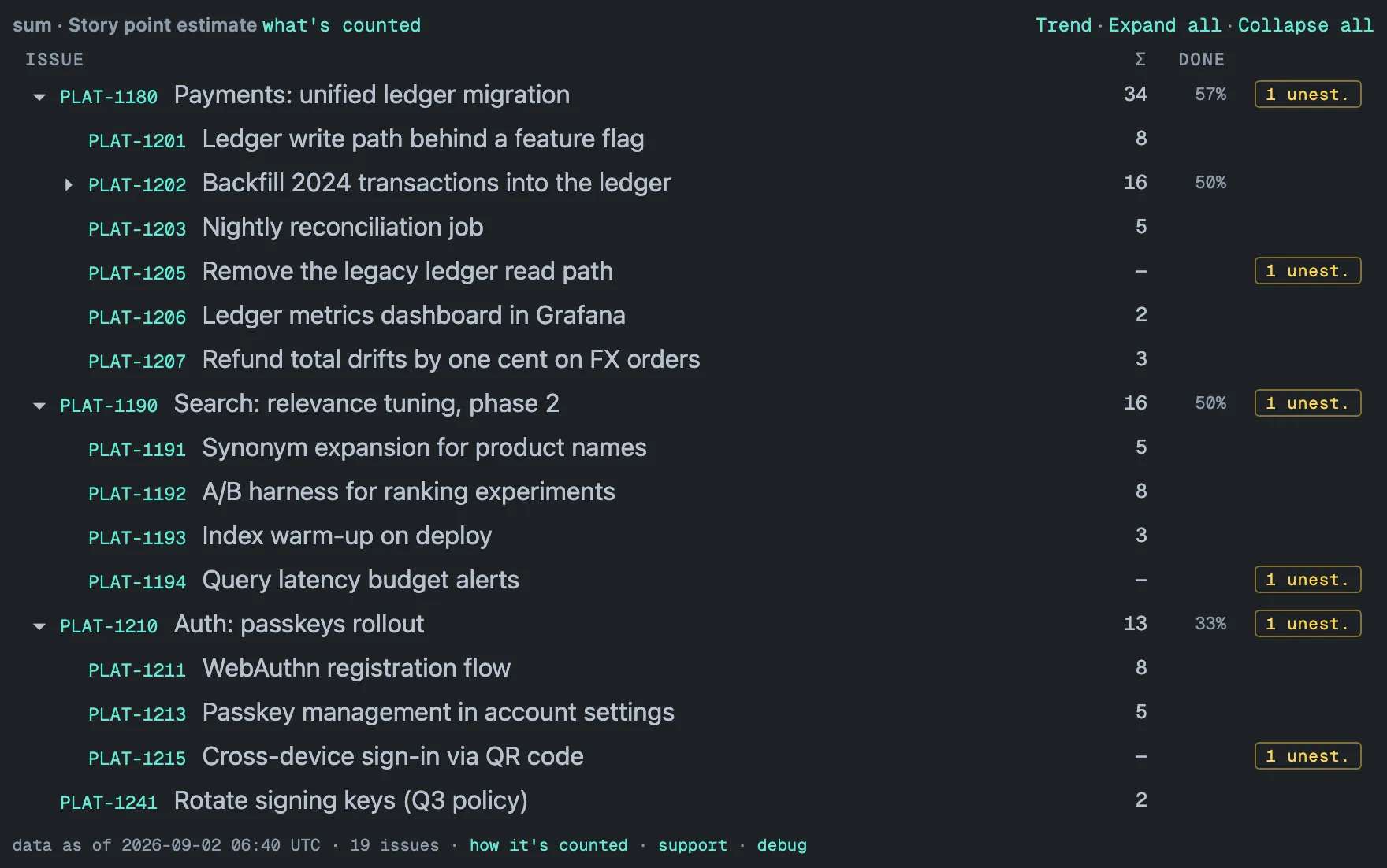
Hierarchy Totals is a Jira Cloud dashboard gadget on the Atlassian Marketplace. It is built around one decision: totals are computed in the background before you open the dashboard, not while you wait. Every configured project is re-read in full once a day, with an hourly update in between, and the gadget’s tile on your dashboard reads the stored result — a 31,000-issue portfolio renders in about a second and a half. The footer carries a “data as of” stamp instead of pretending the numbers are up to the minute, and because the totals are captured every day the gadget can also draw a trend of your totals per project — a history you never had to maintain. All data stays inside your Atlassian site, with no external servers and no telemetry, and the amber unest. badge on an epic narrows the tree to the branches that lead to the issues nobody has sized yet.
A gadget covering several projects shows one bold row per project with its epics beneath — the hierarchy guide has a picture — and how rollups work writes down the rules for sums, averages, medians and unestimated work. If you are weighing a dashboard suite instead, read Hierarchy Totals vs Rich Filters.
Quick decision guide
| You need | Use |
|---|---|
| Points in one sprint | The board header — free, built in |
| Progress of one epic, roughly | The epic progress bar — free, built in |
| Issue counts by category | Two Dimensional Filter Statistics — free |
| A one-off number for a meeting | CSV export + spreadsheet |
| A number written onto the epic itself | An Automation rule per level, within your allowance |
| Estimates rolled up inside a plan | Plans — Jira Premium or Enterprise |
| Totals through the hierarchy, across projects, kept up to date on a dashboard | A rollup gadget such as Hierarchy Totals |
[ questions ]
▸Does Jira sum story points to the epic automatically?
No. In Jira Cloud the epic's Story Points field only changes when a person or an Automation rule edits it; child estimates are not added into it. The epic progress bar reads child statuses, and Plans (Jira Premium and Enterprise) show rolled-up estimates inside the plan. A rollup gadget such as Hierarchy Totals computes the totals from the parent field without writing to any issue.
▸Why are my story points not rolling up to the epic?
Usually because nothing is doing the rolling — Jira has no built-in rule for it. If you rely on Automation, check four things: the rule recalculates only when its trigger fires, so older epics stay blank until a child changes; one rule covers one parent–child level; children in another project need a multi-project rule; and team-managed projects store estimates in Story point estimate, a different field from Story Points, so a rule or gadget pointed at the wrong field reads nothing.
▸Can Jira Automation sum story points to the epic?
Yes. Atlassian's "Sum up story points" template writes {{issue.subtasks.Story Points.sum}} to a sub-task's parent, and its knowledge base shows the epic case: a Lookup work items action over parent = {{triggerIssue.parent}} and {{lookupIssues.Story Points.sum}} written to a number field on the epic. The rule fires only on the events you name, and every step counts against your monthly automation allowance.
▸Do I need Jira Premium to roll up story points?
Only for Plans. Rolled-up estimates in a plan, and hierarchy levels above the epic, are Jira Premium and Enterprise features. Automation rules and dashboard gadgets do not need Premium. Hierarchy Totals is a dashboard gadget, not a Plans feature: it follows the parent field your site already has — the default epic, story and sub-task levels, or the extra levels a Premium site defines — and is free on Jira sites with up to 10 users.