Cross-project rollups of story points and estimates up the Jira hierarchy — precomputed, so dashboards open fast.
[ how teams use it ]
all use cases →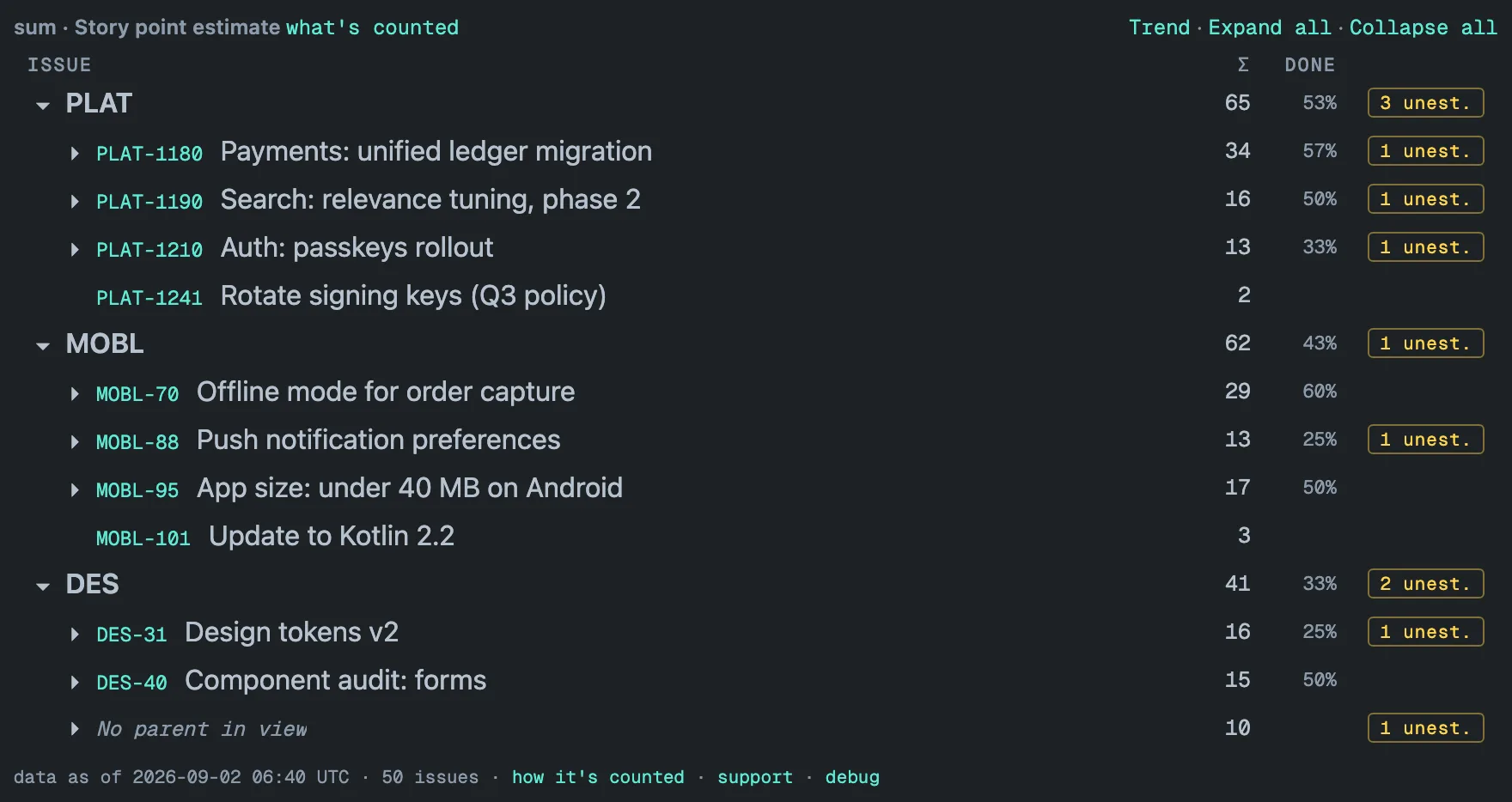
Hierarchy Totals is a Jira Cloud dashboard gadget that sums story points, estimates or time up the issue hierarchy — sub-task → story → epic → any level above — across up to 50 projects, from a stored copy precomputed in the background, so a 31,000-issue portfolio renders in about 1.5 s.
It is built for delivery leads, product managers and Jira admins who need those totals on a dashboard, kept current without anyone running a report.
Sum story points and estimates up the Jira hierarchy
Every row aggregates the issue itself plus everything below it: sub-task → story → epic, and any Advanced Roadmaps level above. The hierarchy is Jira’s parent field; issue links are not followed. Six operations — sum, average, median, min, max, count — with median taken over the full distribution, not over sub-totals. The Σ column carries the result; the DONE column shows the share of the work under the row that is done — sub-tasks, and stories without sub-tasks; an epic is never counted itself. Dirty data stays visible: a leaf with no value shows “—” and adds to the amber “N unest.” badge on itself and every row above it, four or more issues in a project whose parent is outside the gadget gather under “No parent in view” (fewer stay as top-level rows), and the footer’s “how it’s counted” link counts what sits outside the hierarchy.
It works on Story point estimate, Story Points, business value or a number field of your own, and on three time-tracking fields — Original estimate, Time spent, Remaining estimate — shown in hours.
Cross-project totals on one dashboard
Pick up to 50 projects for one gadget. Each gets its own bold row and total — the screenshot at the top shows three — and a story whose epic lives in another selected project is counted under that epic. Past roughly eight projects the tile gets crowded — the settings screen says so — and a JQL filter usually reads better than more checkboxes.
Precomputed, so a 31,000-issue dashboard opens in about a second and a half
Rollup gadgets that compute when you open the dashboard read thousands of issues, add them up, and you wait — on a large site, long enough that the gadget can give up before it draws anything. Forge, the Atlassian platform this app is built on, allows about 25 seconds per render, and we ran into that limit ourselves on a project of more than 30,000 issues before moving the work out of the render.
Hierarchy Totals does the reading ahead of time. A background sync keeps a stored copy of every configured project inside your Atlassian site — Atlassian-hosted storage attached to the site, no external servers — re-reads it in full once a day and patches it hourly. Opening the dashboard only reads that copy and draws it. A 31,000-issue portfolio renders in about a second and a half; 13 projects and 47,000 issues render in under three seconds. Render time is driven mainly by how many issues the gadget covers, and a single render reads up to 50,000 issues — above that the tile says the numbers are partial, behind the footer’s “how it’s counted” link.
The first pass starts the first time the gadget is rendered. While it runs, the tile shows a live preview of up to about 500 issues, labeled as a live preview in the footer, and replaces it with the complete numbers on its own — after minutes on a small site, an hour or more on a large one. From then on every render carries a “data as of” stamp in the footer, and the tile warns when its numbers are more than 48 hours old. Details in Freshness & performance; how this differs from computing at render time, with dated public reviews, in Hierarchy Totals vs Rich Filters.
Trend, filters and drill-down
Open work only
One checkbox turns every number into remaining work. It excludes issues whose status category is Done — so a Cancelled or Won’t Do status counts as done when your workflow puts it in the Done category, whatever it is called — and a Done epic with open children stays in the tree as a container. How rollups are computed has the full rules.
JQL filtering
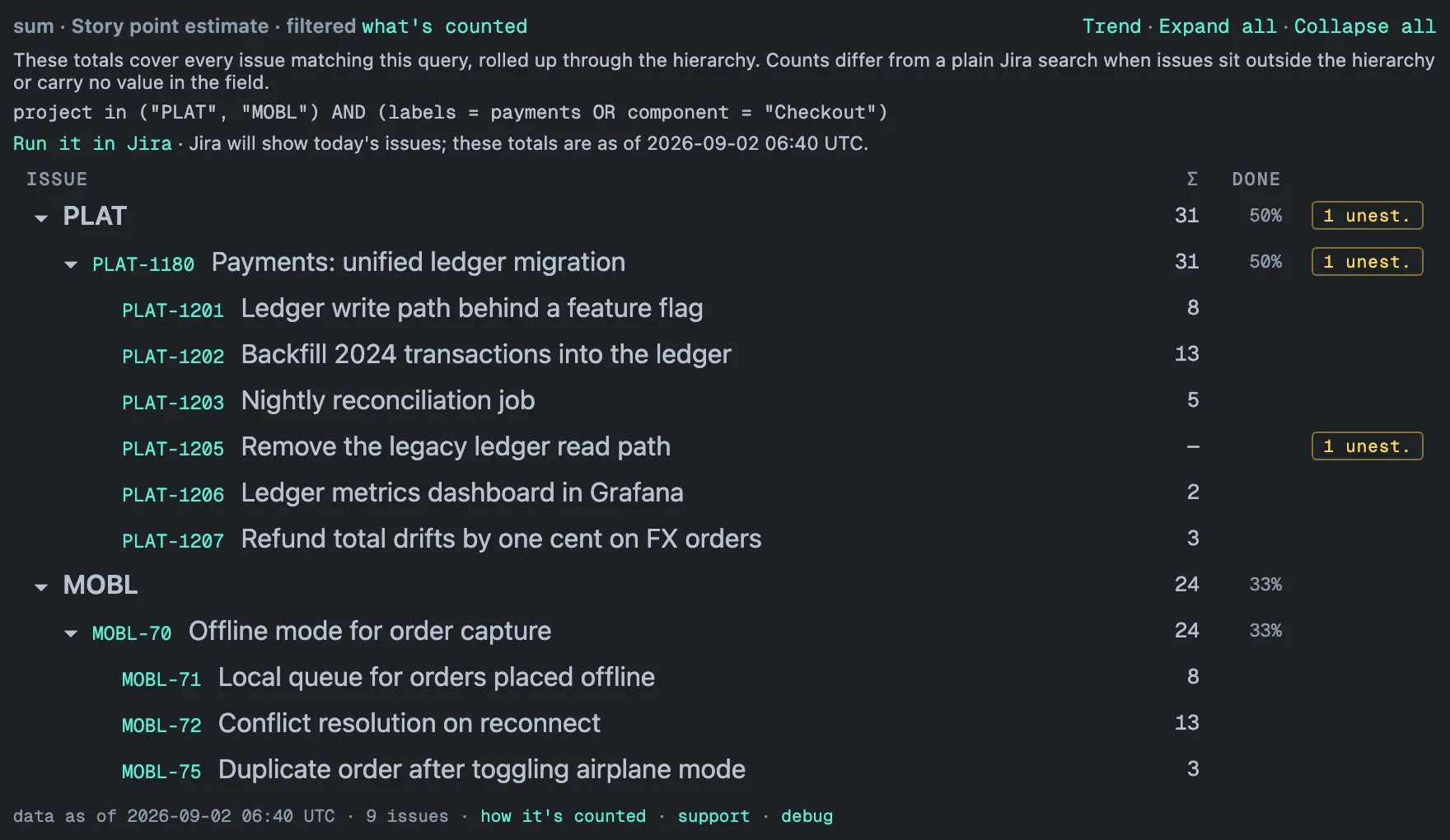
Narrow a rollup to a release, a label or a component with Jira’s own JQL editor, on top of the selected projects (filters up to 500 characters). The tree keeps its shape — matching issues plus their ancestors as containers — and “what’s counted” in the header opens the exact query behind the numbers, one click from running it in Jira. Saved filters need to be shared with the app; details in Filtering with JQL.
Trends
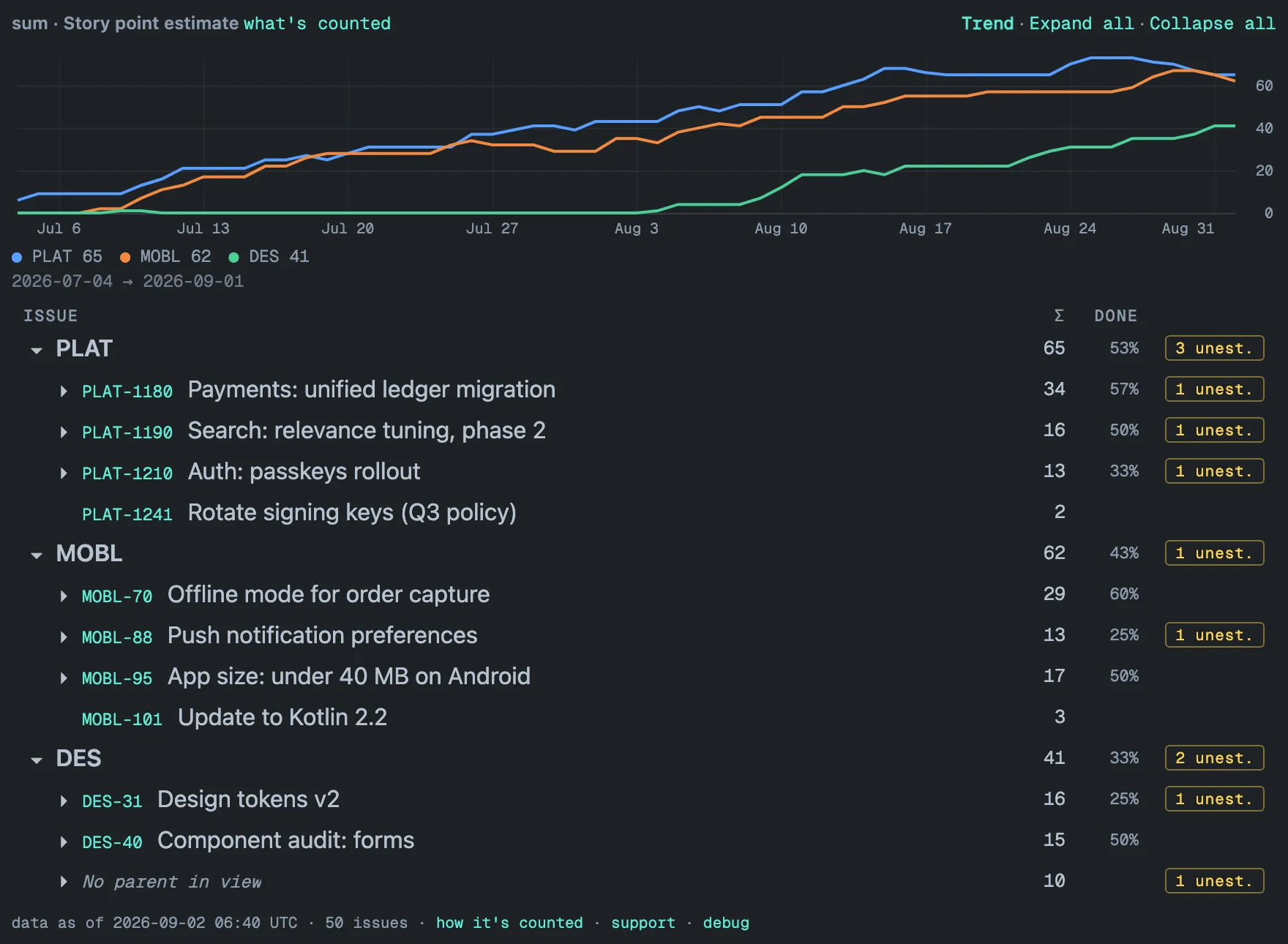
The daily full re-read captures one point per project, and the Trend panel draws them as one line per project with the latest value in the legend; a filtered gadget draws a single line for its filtered total. The chart shows the stored history, up to 400 days back — daily points for the last 90 days, weekly before that. The line appears from the second day; a filtered gadget’s trend starts the day it is configured. The Trend is withheld from viewers who cannot see the whole configured scope. More in Trends & history.
Drill-down
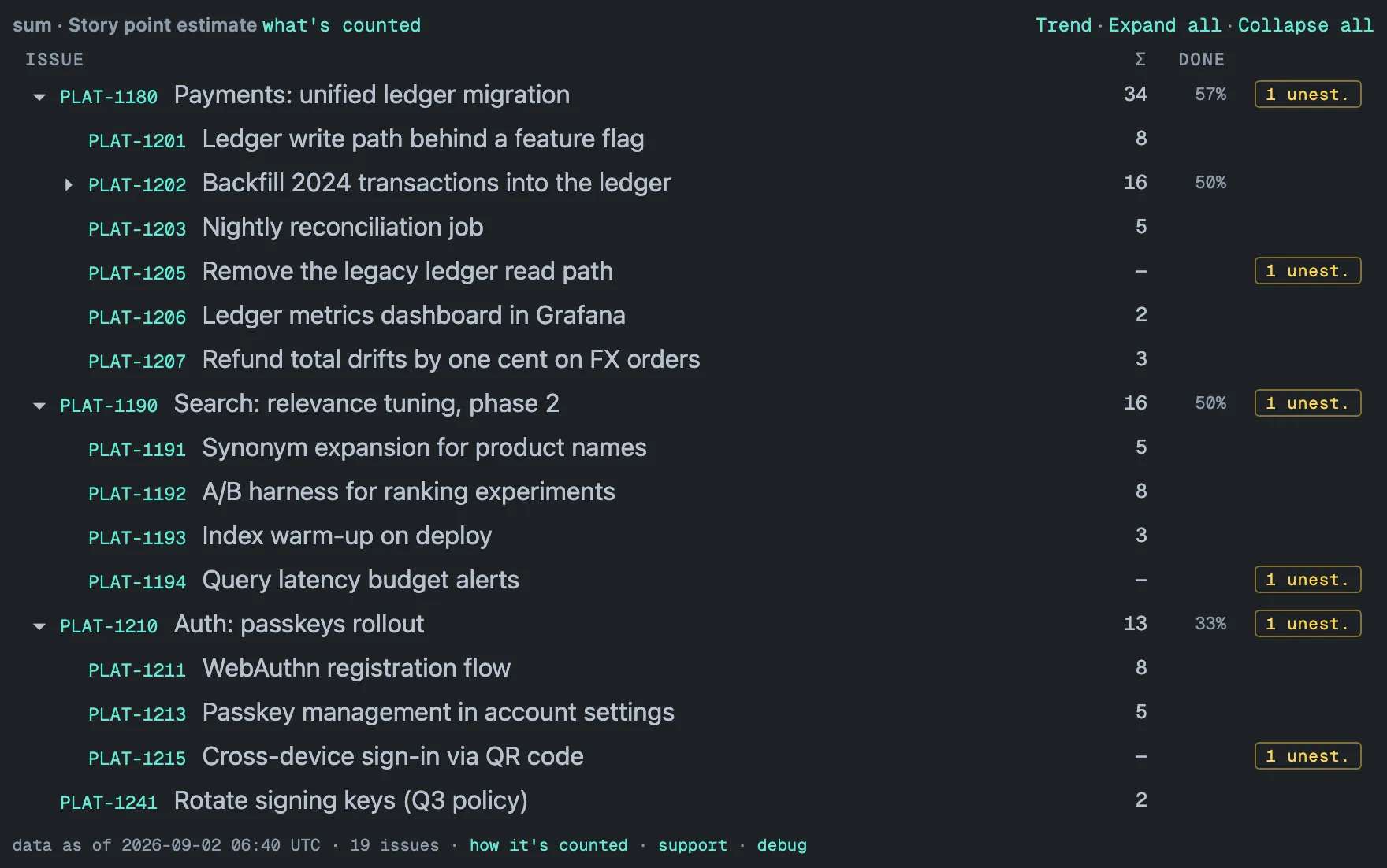
Issue keys open the issue in Jira. The “N unest.” badge on an epic or project row switches the tile to unestimated-only mode, which leaves just the branches with unestimated leaves; “Show all” returns to the full tree. Very large trees load detail on demand — “+N …” chips for rows not yet listed and “Show 100 more” after 100 rows on one level — and the tile remembers which rows you opened, and where you scrolled, in your browser for 12 hours. More in Drill-down.
![Unestimated-only mode: a line reading [ unestimated only ] with a Show all link under the header; only the three PLAT epics with unestimated leaves remain — PLAT-1180 with 34 and 57%, PLAT-1190 with 16 and 50%, PLAT-1210 with 13 and 33%, each carrying a 1 unest. badge — and each is opened to the one story that has no estimate: PLAT-1205, PLAT-1194 and PLAT-1215, showing an em dash in the Σ column and their own 1 unest. badge; footer: data as of 2026-09-02 06:40 UTC, 19 issues.](/_astro/tile-unest.CH64xODD_Z1ps0SX.webp?dpl=dpl_J7RjW73XeVzueQWrFTKEAKBXku7q)
Built to be trusted
The app asks for read-only Jira scopes and cannot change an issue. Everything it stores stays inside your Atlassian site, in Atlassian-hosted storage attached to the site — no external servers, no telemetry — which makes it eligible for the Runs on Atlassian program. Every viewer sees only the projects they can browse and the issues their issue security allows; a hidden project is counted as hidden, never shown. Security & data handling lists exactly what is stored and for how long, and Limits every number you can bump into.
Pricing and availability
Free on Jira sites with up to 10 users. Paid tiers are billed through the Atlassian Marketplace and are published with the listing. Hierarchy Totals is on the Atlassian Marketplace and runs on Jira Cloud only. Ask a question if something here is unclear, or see the FAQ below.
Read on
- Getting started — add the gadget, pick projects and a field, and what the first render shows.
- Hierarchy Totals vs Rich Filters — the trade-offs, with dated sources.
- Guides: How to sum story points across epics and projects in Jira and Jira issue hierarchy explained.
- Support: the contact form or support@claused.io — answered within two business days, critical breakages within 24 hours.
- Changelog and roadmap.
[ frequently asked ]
▸Does my data ever leave Jira?
No. The app is built on Atlassian Forge: its stored copy of your issues lives in Atlassian-hosted storage inside your Jira site, it has no external servers and no telemetry, and its Jira scopes are read-only. That is what makes it eligible for Atlassian’s Runs on Atlassian program. Details are in Security & data handling.
▸How fresh are the numbers?
Every configured project is re-read in full once a day and patched by an hourly update; opening a gadget whose numbers are more than an hour old also starts an update in the background. The daily full re-read is what catches deleted issues and moves between projects. Once the first pass has landed, the footer of every gadget shows the exact “data as of” time, and a notice appears when the numbers are more than 48 hours old. More in Freshness & performance.
▸Will it handle our large instance?
That is the reason the app exists. Totals are precomputed in the background and each render reads a stored snapshot, so a 31,000-issue portfolio renders in about a second and a half, and 13 projects with 47,000 issues in under three seconds. A gadget reads up to 50,000 issues per render and says “partial” above that, behind the footer’s “how it’s counted” link; very large trees load detail on demand — a “+N …” chip fetches the rows held back under a parent, and each level shows 100 rows before a “Show 100 more” link. On a large site the first background pass takes an hour or more, and the tile shows a live preview read straight from Jira until the complete numbers land. The full list of limits is on the Limits page.
▸Which fields can I roll up?
Number-type custom fields — Story point estimate, Story Points, business value, your own number fields — plus three time-tracking fields: Original estimate, Time spent and Remaining estimate, shown in hours. Dates, votes, sprints and other field types are not offered. Pick one field per gadget; several gadgets on one dashboard can watch different fields of the same projects. How each field is summed is in How rollups work.
▸What operations are supported?
Sum, average, median, min, max and count. Every row aggregates the issue itself plus everything below it, and issues with no value in the field stay out of the calculation — an average divides only by the issues that carry a value, while count counts every issue in the subtree. Median is taken over the full distribution of values in the subtree, not over sub-totals, so it holds at every level including the per-project rows. Details in How rollups work.
▸Can viewers see projects they don't have access to?
No. Every render is filtered by the viewer’s own Browse permission and issue security, checked on each request, so a shared dashboard shows each person only the projects and issues they can already see in Jira. Hidden projects are counted as hidden — the tile says how many — and never shown. The Trend is withheld from a viewer who cannot see the whole configured scope, so its line never reveals totals for hidden issues. See Security & data handling.
▸What does the "unest." badge mean?
The number of issues in that subtree with no value in the selected field — counted over leaf issues only, since parent issues conventionally carry no estimate of their own in Jira. On a row with children the amber badge is a button: click it and the tree prunes to exactly the branches with unestimated leaves; Show all brings the full tree back. On a single issue the badge is plain information — that row is the unestimated item — so it is not clickable. Under the count operation there is no badge at all. More in Drill-down.
▸How does "Open work only" decide what's closed?
By status category — the gray / blue / green classification (To Do, In
Progress, Done) every Jira status must belong to and no admin can customize.
It is the same test as the JQL statusCategory != Done, so Cancelled,
Rejected and Won’t Do count as done, not just a status literally named
“Done”. A done epic with open children stays in view as a container, and
the DONE column keeps counting over all statuses even when the totals cover
open work only. See
Open work only.
▸Why does the gadget ask me to allow access?
Because the app reads Jira as you, so that your own Browse permission and issue security decide what you see, and Atlassian requires each user to grant that once. Click “Grant access” in the tile, accept Atlassian’s consent dialog — the scopes it lists are read-only — and the tile reloads with your numbers. If the prompt keeps returning, remove the app’s stale grant under Connected apps in your Atlassian account and grant access again. See Security & data handling.
▸What does it cost?
Hierarchy Totals is free on Jira sites with up to 10 users. Paid tiers for larger sites are billed through the Atlassian Marketplace and are published with the listing. If a subscription lapses, the gadget shows a notice instead of the numbers until a Jira admin renews it from the site’s app administration; your data and history are kept and come back the moment the subscription is active again.