How rollups are computed
updated 2026-09-20
The one principle
Every row aggregates the issue itself plus everything below it — its own value, if it has one, together with every descendant’s value at any depth. An epic that carries its own estimate adds it to its children’s. The footer’s how it’s counted link opens this rule on the tile itself.
The Σ column is that aggregate. Behind it sits a list: the value of every issue in the subtree that has one in the selected field. Issues without a value are simply absent from the list — they are not zeros, and they never pull an average down. The operation is then applied to the list:
| Operation | Meaning |
|---|---|
| sum | Total of the list |
| avg | Sum ÷ number of issues with a value |
| median | Middle of the sorted list (even count → mean of the two middle values) |
| min / max | Smallest / largest value in the subtree |
| count | Number of issues in the subtree, the row itself included — with or without a value |
Two consequences are worth spelling out:
- A leaf with value v shows v under every operation except count,
where it shows 1. A leaf without a value shows
—(a dash, never a fake zero) — again except under count, where it still shows 1. - A parent’s count includes the parent: an epic with six stories shows 7. Project rows and the two containers described below are structure, not issues, so they never add to a count.
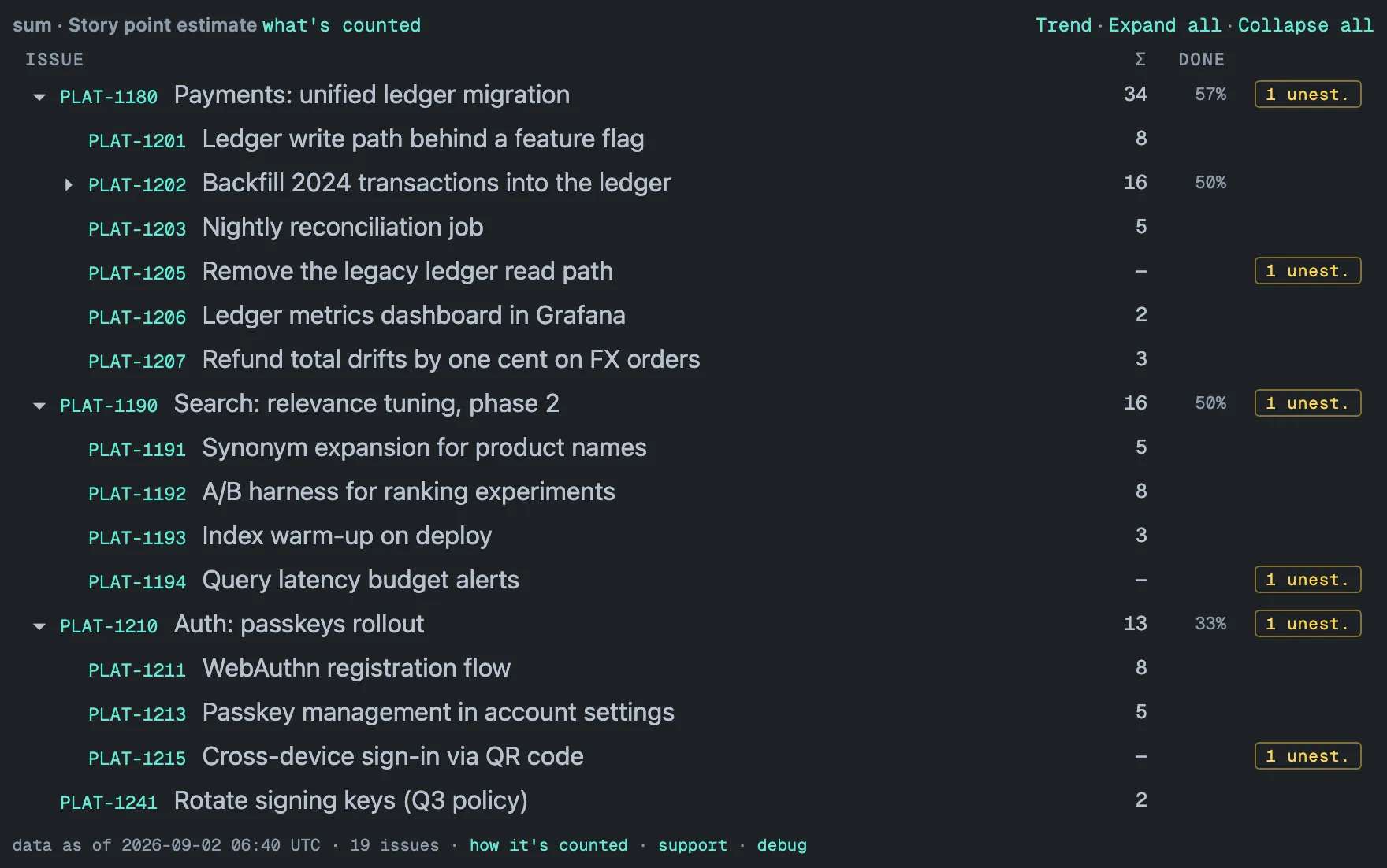
Unestimated
The amber N unest. badge counts leaf issues in the subtree that have
no value in the selected field. Parent containers without their own
estimate are the Jira norm, not a data-quality problem, so they are not
counted — the badge points at actual work nobody sized. A leaf with no
value shows — and its own 1 unest.; every row above it adds that leaf
to its count.
On rows with children the badge is a button: click it to see only the branches that contain unestimated work (drill-down). Under count the badge is not shown at all — every issue has a count.
Two containers for untidy data
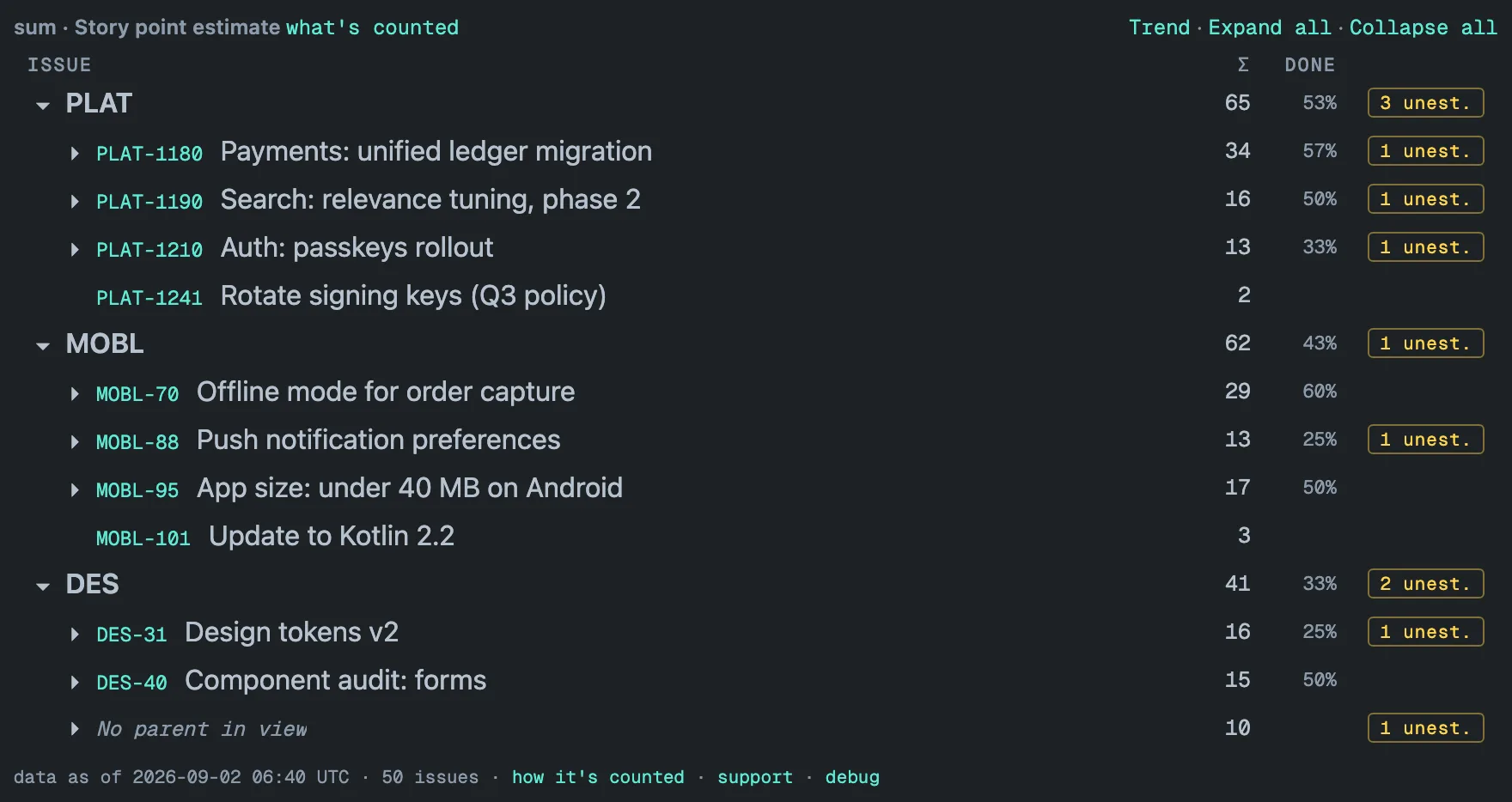
Real Jira data has issues whose parent sits somewhere else, and top-level issues that carry no value. The gadget keeps them in view instead of guessing or hiding them, and once there are enough of them in one project it folds them into a single row:
- No parent in view — issues whose parent is outside the gadget: in a
project you did not select, or an issue your issue-security level does
not let you see. Fewer than four in a project stay where they are, as
ordinary top-level rows. Four or more are gathered under an italic
No parent in view row at the end of that project’s list, with their
subtrees and correct aggregates, one click away. How it’s counted in
the footer counts them as
N outside hierarchy. - No value set — top-level issues in a project that have no children and no value in the field. Again, fewer than four stay inline; four or more are gathered under No value set. Under count nothing is gathered, because there every row has a value.
Both containers start collapsed, and nothing is dropped: expanding the row shows every issue inside.
Parent links that form a cycle (an import gone wrong) are always cut in
the same way, so the same issue is never counted twice, and how it’s
counted reports it as N cycles broken.
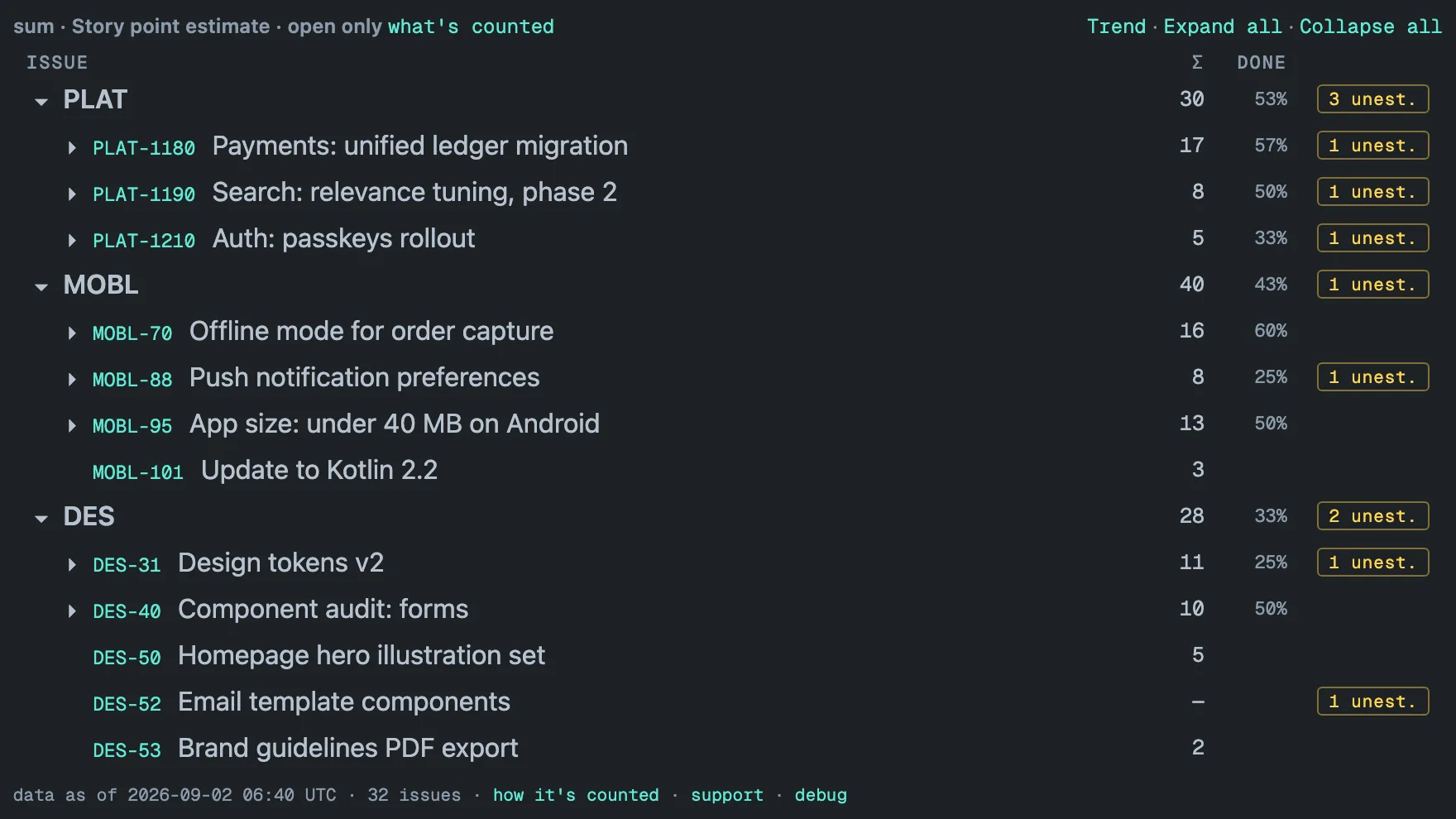
Open work only
With Open work only checked in the gadget settings, the header reads
· open only and the totals cover only issues whose status category is
not Done — the same test as the JQL statusCategory != Done. The category
is the one status attribute no Jira admin can rename away: Cancelled,
Rejected and Won’t Do all map to Done, so they count as done here too, not
just a status literally named “Done”.
Three rules follow:
- A done epic with open children stays in view as a container. Its own value is left out — finished work adds nothing to remaining totals — but the open stories under it keep their place instead of floating loose.
- Σ, the
N unest.badge and the footer’s issue count are computed over the open issues only. - The DONE column keeps its percentages. It is always taken over the work under the row in every status — so it keeps answering “how far along is this?” while Σ answers “how much is left?”. A row carries a percentage only while it has rows under it, so an open epic whose work is all done — nothing is listed below it any more — leaves the cell empty instead of reading 100 %.
The DONE column
The DONE column carries a percentage on rows with children and on project rows only — a single issue leaves the cell empty, and so do No parent in view and No value set. The figure is the share of the work items under the row that are done.
A work item is an issue with nothing below it: a sub-task, a story without sub-tasks, a standalone task. An epic, or a story with sub-tasks, is never counted itself — its work is. This is the one column where a row does not count itself: Σ includes the row’s own value, DONE leaves the row out. Done is the status category Done, the same test as Open work only uses.
Two consequences:
- An open epic whose stories are all done reads 100 %. The epic’s own status is not one of the things counted.
- A Done epic whose work is all still open reads 0 %. Closing the container closes none of the work under it.
The share is always taken over all statuses, even when the gadget shows open work only — in the capture above PLAT reads 53 % with and without Open work only. What that mode can take away is the rows under a row: an open epic whose work is all done then has nothing listed below it, and its cell is empty rather than 100 %.
A JQL filter does narrow the share: it then counts the matched issues only. Ancestors kept for structure count as nothing, and a matched issue whose children did not match is itself the work item, counted once by its own status. So the same project can read a different percentage filtered than unfiltered.
The tile states the rule itself. The DONE header carries it as a tooltip, and how it’s counted shows a second line for this column while the column is on screen.
The percentage is rounded, with one deliberate exception: 0 % and 100 % are shown only when they are exact. A row with 998 of 1,000 work items done shows 99 %, so two open work items never disappear into a rounded figure.
The column needs room. It is shown when the tile is wider than 520 px and hidden on narrower tiles to keep issue keys readable; the Σ column is always there.
The number is the one
Hierarchy Progress prints
as % DONE for the same row — both gadgets count work items by the same
rule. What the second gadget adds is the count behind the share (4 / 7),
the share by story points or another number field, what is left, a bar, the
rows furthest behind listed first, and a trend of each project’s percentage.
Which hierarchy is followed
The tree is Jira’s parent field, and only that:
- Sub-task → story, task or bug → epic → any level above epic that your site defines in Advanced Roadmaps (Plans). Those higher levels are parents like any other, so they roll up with no extra setup.
- Team-managed and company-managed projects work the same way, because in Jira Cloud both record the hierarchy in the same parent field.
- Issue links are not followed — not “relates to”, not “blocks”, not a custom link type used to build a hierarchy of its own. An issue reached only through a link is a separate root.
An issue whose parent is outside the gadget becomes a root of its own, and once four or more of them sit in one project they are gathered under No parent in view, as described above.
Time-tracking fields
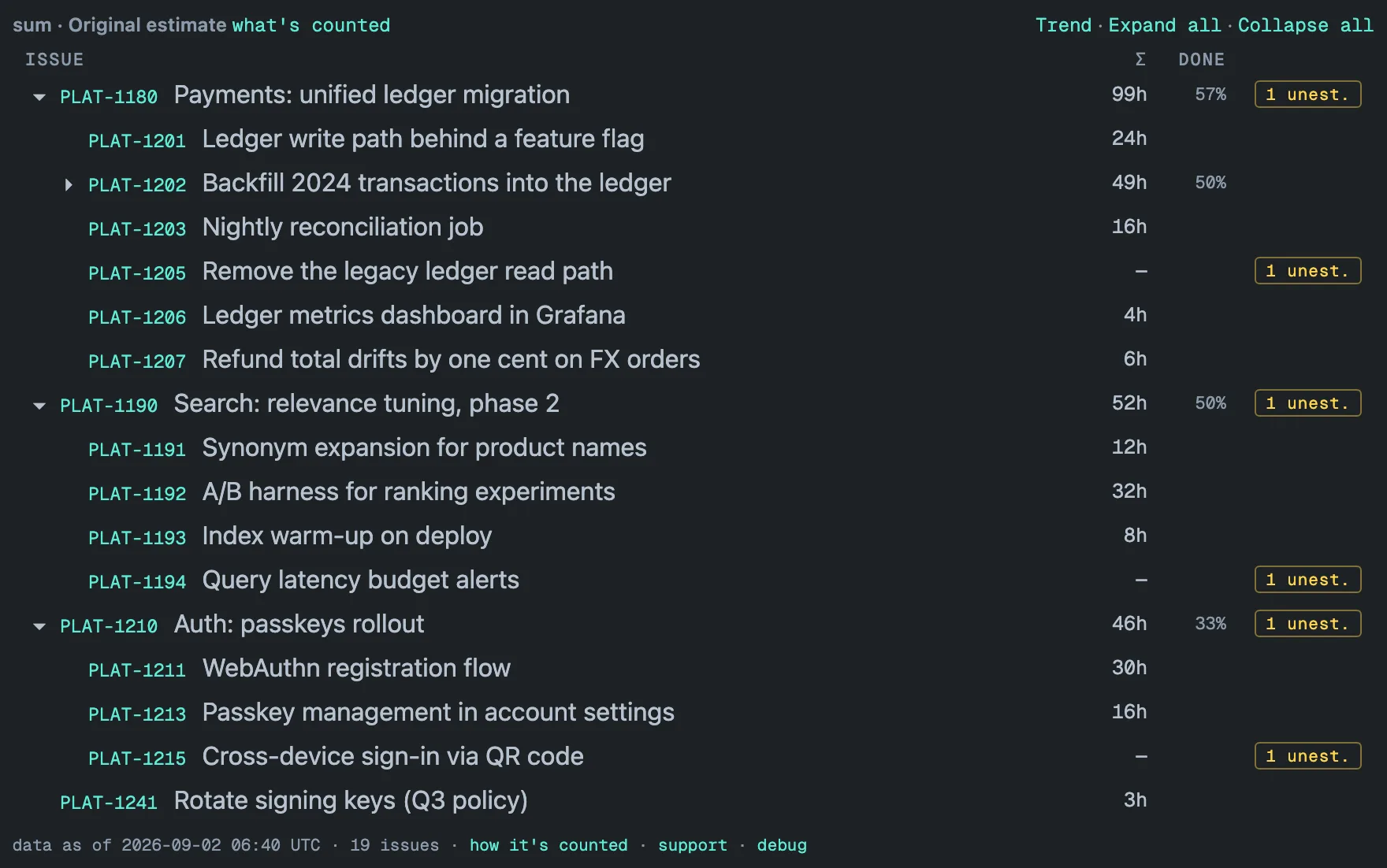
Original estimate, Time spent and Remaining estimate arrive from Jira as
seconds; the gadget shows them in hours with an h suffix (99h,
12.5h), with up to two decimals in your Jira locale. Count is the
exception — counting issues has nothing to convert. Everything else works
exactly as for a number field: a row with no time set shows —, and if it
is a leaf it carries the badge.
Per-project rows
With two or more projects, the gadget always shows one bold row per project. Each project row is computed like any other subtree — meaning its median and average come from the full distribution of that project’s values, not from combining epic-level results (a median of medians is a different, wrong number). Its count is the number of issues in its subtrees.
An issue whose parent is in another selected project sits under that parent, and the whole subtree is attributed to the project of the topmost parent — so an epic’s cross-project children count toward the epic’s project, every issue is counted in exactly one project, and nothing is counted twice.
The 520 px width, the 100 rows shown per level before Show 100 more, and the other sizing numbers are collected on the limits page.