Freshness & performance
updated 2026-09-20
Where the numbers come from
Most rollup gadgets query Jira and add things up when you open the dashboard, which is why they slow down or time out on large sites. Hierarchy Totals keeps a stored copy of every configured project in Atlassian-hosted storage inside your Jira site and renders from that copy. Rendering a precomputed snapshot takes seconds, not minutes: a 31,000-issue portfolio renders in about a second and a half, and 13 projects with 47,000 issues render in under three seconds.
The trade-off is that a render shows the stored copy, not this second’s Jira. The rest of this page is about how current that copy is, how the tile says so, and what to do when it falls behind.
When data refreshes
| When | What happens |
|---|---|
| You save a gadget with a project the app has not synced yet | The first pass starts on that render: minutes on a small site, an hour or more on a large one — past seven projects the reads start seven at a time, fourteen minutes apart. Until it lands, the tile shows a live preview of up to about 500 issues, says live preview in the footer, and replaces it with the complete numbers on its own — they may be higher or lower than the preview. |
| You add a gadget on a number field its projects were not read with yet | Those projects are read again in full with the new field, paced like a first pass. Until every one of them carries the field, that gadget computes its numbers live from Jira instead of drawing a stored copy that holds the field on some issues only. Other gadgets on the same projects keep their numbers. |
| Hourly update | Issues changed since the last pass are written into the stored copy. |
| Full re-read, once a day | Every configured project is read again from Jira in full. This is the pass that also removes deleted issues and issues moved to another project — the hourly update cannot see those. The hour is chosen by the platform. |
| Someone opens a dashboard whose data is more than an hour old | An hourly update is started in the background; the tile shows the current copy meanwhile. |
A full re-read is built next to the copy in use and swapped in whole, so while it runs you keep seeing the previous complete numbers. The hourly update writes changed issues into the copy in place; a render that lands in the few seconds it is writing can briefly mix old and new values, and the next render corrects it.
A gadget on a new number field
While its field is being read, such a gadget reads up to about 500 issues
live from Jira on every render, the way a live preview does. The footer says
computed live — re-read running on the render that starts the re-read and
live preview — background sync running while the re-read is under way — a
Jira admin sees how many issues it has stored so far instead. The re-read
starts on that render, or with the next hourly update when nobody has the
dashboard open, and the tile changes to data as of … UTC on its own once
every project carries the field.
The footer
Every render ends with a line saying what you are looking at:
data as of 2026-08-30 05:10 UTC · 50 issues · how it's counted · support · debug
- data as of — when the stored copy was last completed, in UTC. With several projects it is the oldest of their dates, so one project that fell behind shows here.
- N issues — how many issues the totals cover. The what’s counted link in the header shows the exact query behind that number and lets you run it in Jira — Jira will show today’s issues, the tile shows the issues as of the footer date. Counts can also differ from a plain Jira search when issues sit outside the hierarchy or carry no value in the field — the panel says so.
- how it’s counted — opens a short panel under the footer: the rule
behind the numbers, then everything the table does not show, one remark
per line.
N outside hierarchycounts issues whose parent is not part of the rollup — they are still counted, at the top level of their project; see How rollups work.partial,N rows not listedandN cycles brokenappear here too, and during a live preview the full sentence about the first pass. - support opens our contact form with the app pre-selected. debug copies a compact diagnostic block — build, freshness, counters, the last sync error — and never issue keys, summaries or your JQL. Paste it into the support form and the ticket is actionable without back-and-forth.
Very large portfolios
Two limits apply to very large portfolios, and the tile states both rather than hiding them — in the how it’s counted panel under the footer.
Up to 50,000 issues are read per render. For a gadget whose projects and
filter cover more than that, how it’s counted says
partial: above the size cap and names the projects with no data or only
partly summed; the what’s counted panel says the same. Narrow the projects
or the filter to get complete numbers.
On a very large tree, the deepest rows load on demand. Totals are
computed over the full hierarchy, but on a very large tree the deepest rows
are not sent to the browser up front. A row whose children were held back
shows a +N … chip in its right-hand column; click it and exactly that
branch loads; click again on the rows below to go deeper (see
Drill-down). How it’s counted
counts what is currently not listed: N rows not listed (totals include them).
Within one level, 100 rows are shown at a time, then a Show 100 more row
pages through the rest.
Every number a customer can bump into is on the limits page.
When the data is stale
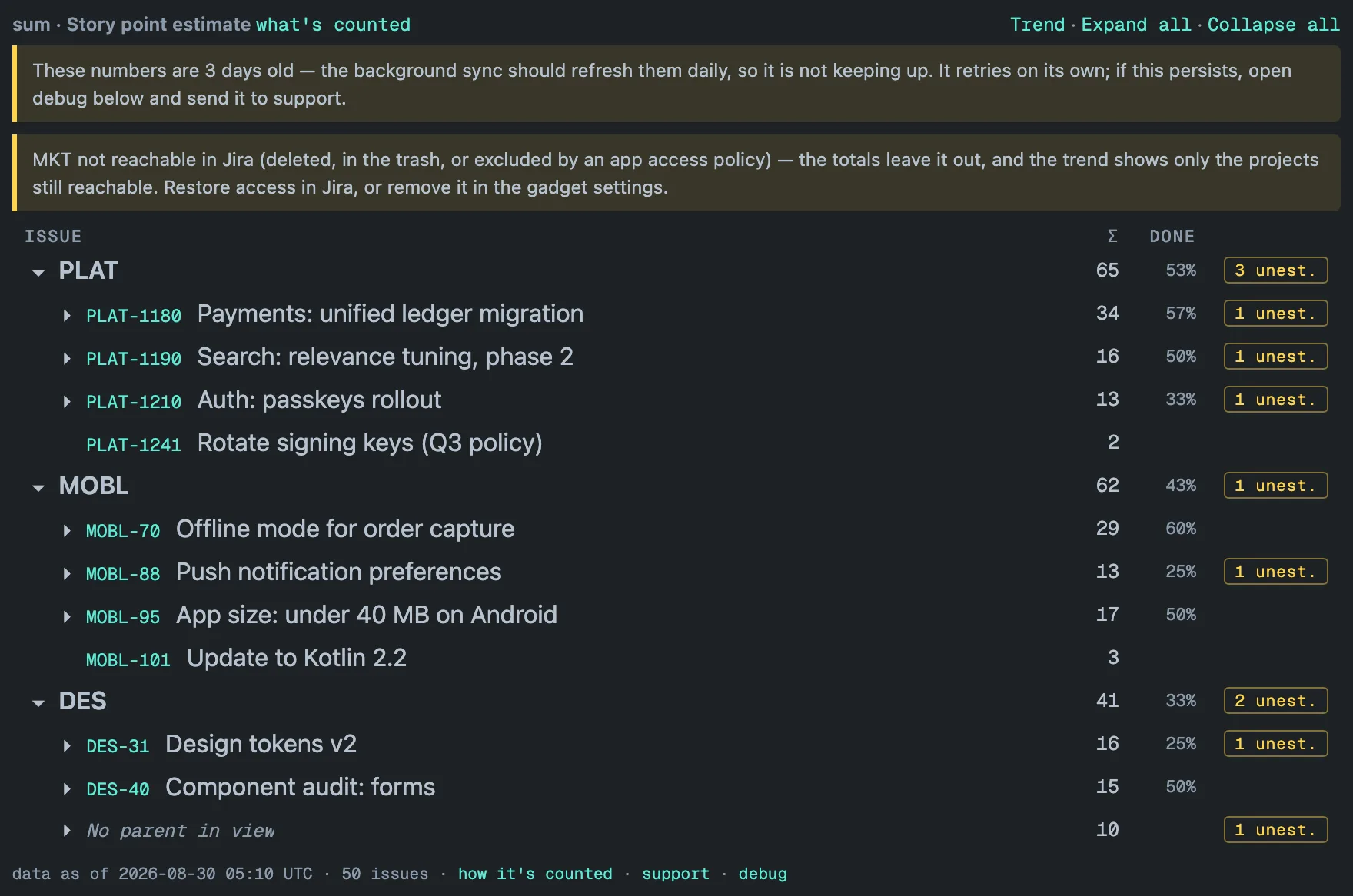
The tile compares the footer date with the clock. Two days without a completed pass and it says so above the table — in the capture above: These numbers are 3 days old — the background sync should refresh them daily, so it is not keeping up. If a pass is running at that moment the notice says so; otherwise it tells you the sync retries on its own and asks you to send the debug block to support if the warning persists. The numbers stay on screen — an old total with its date is more useful than an empty tile — and the notice disappears when a pass completes.
A second notice appears when no full re-read has completed in two days, even if hourly updates are still landing. Hourly updates cannot see deleted issues or issues moved to another project, so the totals can drift high; the notice links a Jira admin to the page described below.
A project that has become unreachable — deleted, in the trash, or excluded by an app access policy — gets a notice naming its key. The totals leave it out. The trend shows only the projects still reachable, or is withheld on a filtered gadget, whose single line covers the whole scope. Restore access in Jira, or remove the project in the gadget settings.
What an admin can do
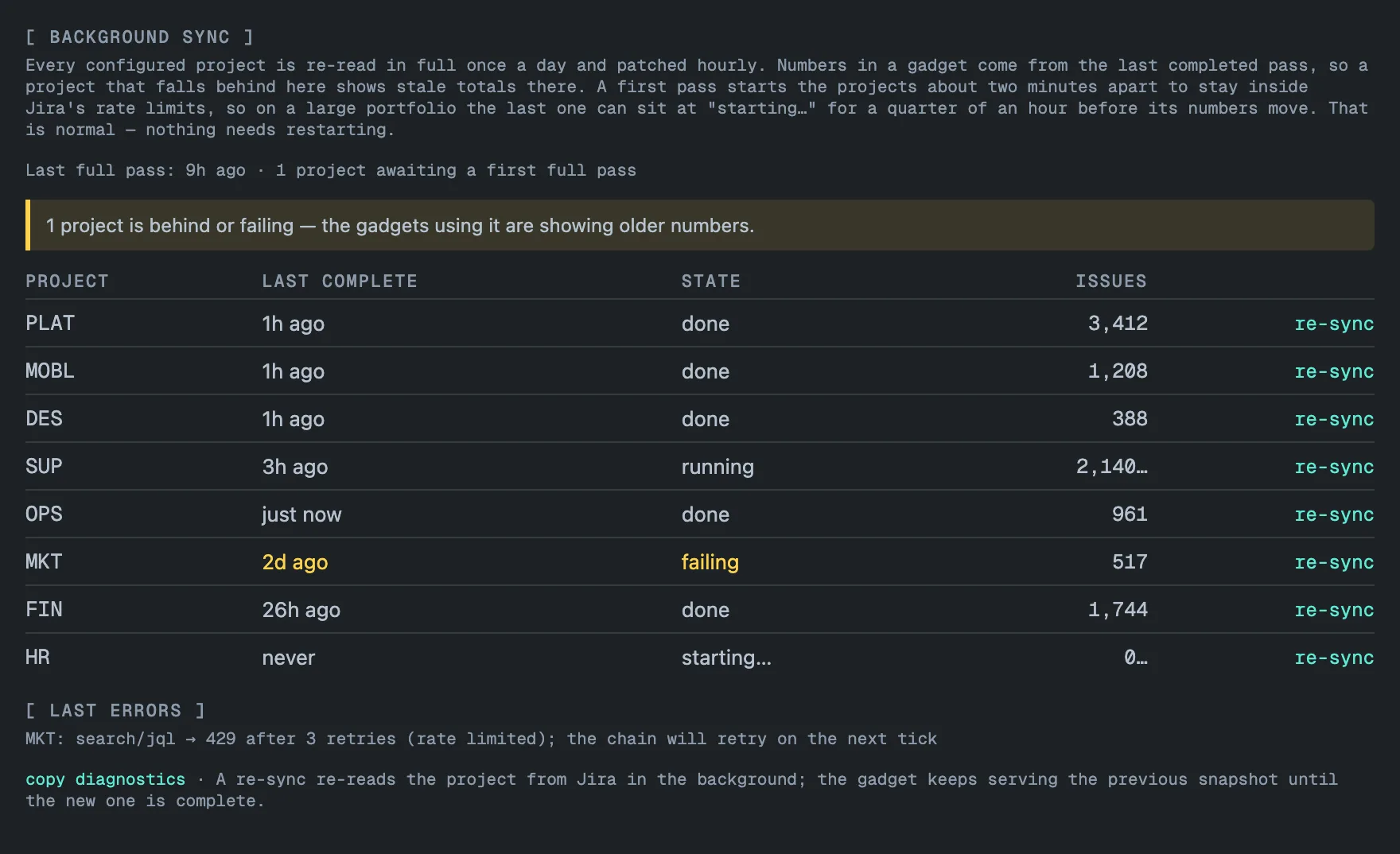
Jira admins have a page of their own under Jira Settings → Apps → Hierarchy Totals. It shows the background sync for the whole site:
- Last full pass — how long ago the last full re-read completed, and how many projects still await their first one. Like the tile, it turns amber after 48 hours.
- One row per tracked project — when its last complete pass finished,
its state (
done,runningwith the issues read so far,failingin amber,starting…for a project queued but not yet read) and the number of issues in its stored copy. - Last errors — the most recent error message for each failing project.
- re-sync — queues a full re-read of that one project in the background; the gadgets keep serving the previous copy until the new one is complete. It needs project-admin rights on that project, and each project accepts one re-sync per 10 minutes. On a site whose subscription is inactive nothing is queued, and the page answers the subscription for this site is inactive — nothing was queued.
- copy diagnostics — copies a text block with the sync state of every project, no issue data, for a support ticket.
While a pass is running the page refreshes itself every 90 seconds. If a refresh fails, the page keeps the last answer it had and says so at the top — Could not refresh just now — everything below is the last answer that arrived, with the time it was read and a Try again link. After repeated failures it waits longer between attempts, up to 15 minutes, and stops after five.
A first pass starts the projects about two minutes apart, seven at a time,
and each further group of seven fourteen minutes after the one before, to
stay inside Jira’s rate limits. So the last project of a group can sit at
starting… for a quarter of an hour before its numbers move, and a project
whose group has not started yet reads never synced. With 50 projects the
last group starts about an hour and forty minutes after the first. That is
normal — nothing needs restarting.
Idle projects
A project that no gadget has rendered for 30 days stops syncing, and its stored copy is dropped — it can always be rebuilt from Jira. Its trend history is kept. The next time someone opens a gadget that uses the project, the app registers it again and starts a fresh first pass: that viewer sees a live preview until the pass lands, exactly as on the first day, and the trend keeps its earlier points with new ones resuming after that pass.
Deleted projects, renamed keys, removed fields
A project deleted from Jira is reported as not reachable (see above) and dropped from the sync after two weeks of not being found; a project in the trash is kept in case it comes back. A renamed project key keeps working. A field deleted from Jira is noticed by the daily pass: the gadget then says the field no longer exists and asks you to pick another, instead of showing confident empty columns. If the field was trashed by mistake, restoring it in Jira brings the gadget back within a day.