[ guide · published 2026-09-02 · updated 2026-09-20 ]
Roll up estimates and time spent to epics in Jira
by Andrey Pavlov · Claused
Someone asks how many hours an epic has consumed and how many are left. Jira has the three numbers — Original estimate, Remaining estimate and Time spent — on every story, and the epic sitting above them shows… very little. This guide covers what Jira Cloud sums natively, exactly where each option stops, and what a rollup of all three fields to the epic looks like.
Short answer: Jira Cloud adds time one level up and no further — Atlassian’s own words on its open feature request. The Time tracking panel’s Include sub-tasks folds sub-tasks into their parent, the Σ columns add a work item’s child work items, and hours logged on a sub-task never reach the epic. The statistics gadgets count work items rather than summing time, and Plans roll up remaining work — inside a plan, on Premium. To total Original estimate, Remaining estimate and Time spent at the epic, or above it, or across projects, you need an Automation rule per level or a rollup gadget.
The three fields (30 seconds)
- Original estimate — how long the work was expected to take when it was planned.
- Remaining estimate — how long is still expected. Jira recalculates it as work is logged, edited or deleted, and lets you set it by hand when the automatic figure is not what you expect.
- Time spent — the total of every work log on the work item.
Jira’s REST API
reports all three in seconds
— originalEstimateSeconds, remainingEstimateSeconds, timeSpentSeconds —
and the UI displays them according to your site’s time tracking settings:
hours per working day, days per working week, and a “pretty” format such as
2d 4h. Keep the seconds in mind: every tool that sums these fields is
really summing seconds and then choosing a unit.
What Jira shows natively on an epic
1. The Time tracking panel and “Include sub-tasks”
Open a story with sub-tasks and the Time tracking panel offers Include sub-tasks. Atlassian’s knowledge base describes the result: the panel’s Time remaining becomes “a summation of remaining on the parent + remaining on the Sub-tasks combined”, and the estimation doc puts it the same way: “Time estimates of subtasks are rolled up to the parent task”.
That is one level: from sub-tasks into the work item directly above them. Atlassian’s knowledge base documents the field for a parent and its sub-tasks; for the epic case the clearest statement is Atlassian’s own note, added in June 2025, on its feature request JRACLOUD-70150: “Time estimate and time tracking currently roll-up to 1 level up based on the hierarchy” — an epic sums its stories, but hours logged on the sub-tasks of those stories never reach it. The request has been open since 2018 and is still “Gathering Interest”. It is also one epic at a time: the panel lives on the issue, not on a dashboard, so twelve epics mean twelve visits.
2. The Σ columns in the issue navigator
Jira has three aggregate fields — Σ Original Estimate, Σ Remaining Estimate, Σ Time Spent — that you can add as columns in the issue navigator or in the Filter Results gadget. Atlassian’s own explainer defines Σ Time Spent as “the total time spent on the parent work item and all its child work items” (Atlassian Team, May 2025), with a story and its sub-tasks as the worked example.
So a saved filter of issuetype = Epic with the Σ columns gives you a
per-epic figure in a list — the epic plus its child work items, as Atlassian
defines Σ. Whether that reaches the sub-tasks under an epic’s stories is the
question JRACLOUD-70150 is about; what the navigator certainly will not do is
add the column up — it lists rows and offers no column total, so the grand
figure across your epics is still a spreadsheet job.
3. Dashboard gadgets: counts, not hours
The built-in statistics gadgets group work items; none of them offers “sum this field”. Atlassian’s gadget list describes Two Dimensional Filter Statistics as tabular data based on a filter, Work item statistics as a filter’s work items “broken down by a field”, and Pie chart as work items “grouped by a statistic type” — every cell in those tables is a count. Put Epic on one axis and you learn how many stories each epic has, not how many hours.
One gadget does work from time fields: the Workload pie chart, which Atlassian notes “relies on fields such as Original estimate, Time spent, and Current estimate”. It divides one filter’s time among assignees or another field — a flat slice with no hierarchy, so it tells you nothing per epic unless you build one filter per epic.
4. Plans (Advanced Roadmaps), on Premium
If your site is on Jira Cloud Premium or Enterprise, a plan can infer parent values from children: roll-ups are switched on from View settings, separately for dates and for “others” — estimation values, releases, sprints and teams — and an arrow marks each inferred value.
Two limits matter for time tracking. Rolled-up estimates are “dynamic and reflect how much work remains to be done” — they can be in hours or days as well as story points, and they decrease as time is logged on children — so a plan answers “how much is left”, not “how much was originally planned” or “how much has been spent”. And the number lives inside the plan view, not on a dashboard.
5. Automation, briefly
An Automation rule can look up an epic’s children and write the sum of a time field into a number field on the epic. It works, with the costs listed in the story-points guide: a rule per level, recalculation only when the rule fires, care about which levels carry estimates. Time fields add one more — the values arrive as seconds, so the rule divides by 3,600 before writing hours, and the result is a snapshot in a custom field, not the field itself.
Where all of this stops
- One level. Atlassian’s own note on JRACLOUD-70150 says it: time rolls up one level and no further, so sub-task hours never reach an epic.
- Counts where you wanted hours. The dashboard gadgets that know about hierarchy count work items; the one that knows about hours knows nothing about hierarchy.
- Cross-project only in Plans. An epic with stories in three teams’ projects is normal in Jira. The panel, the Σ columns and the dashboard gadgets never see the stories in the other projects; Plans do, but inside the plan and only as remaining work.
- Remaining estimate lies on finished work. A story moved to Done with
4hstill in Remaining estimate keeps adding those hours to every total above it. A trustworthy remaining-work figure has to exclude Done work explicitly.
Quick decision guide
| You need | Use |
|---|---|
| One story’s hours including its sub-tasks | The Time tracking panel with Include sub-tasks — free, built in |
| A per-epic figure of the epic and its child work items, in a list | Issue navigator or Filter Results gadget with the Σ columns — free, built in |
| Work item counts per epic on a dashboard | Two Dimensional Filter Statistics or Work item statistics — free |
| One filter’s hours split by assignee | Workload pie chart — free, flat |
| Remaining work inferred in a roadmap | Plans roll-ups — Jira Cloud Premium or Enterprise |
| Original estimate, Remaining estimate and Time spent totalled at the epic and above, across projects, on a dashboard | A rollup gadget such as Hierarchy Totals |
How Hierarchy Totals rolls up time
Hierarchy Totals is a Jira Cloud dashboard gadget on the Atlassian Marketplace. Pick the projects, pick one of the three time fields — Original estimate, Remaining estimate or Time spent — and an operation, and every row shows the total of itself plus everything beneath it, along Jira’s parent field: sub-task → story → epic → any Advanced Roadmaps level above, across up to 50 projects in one tile.
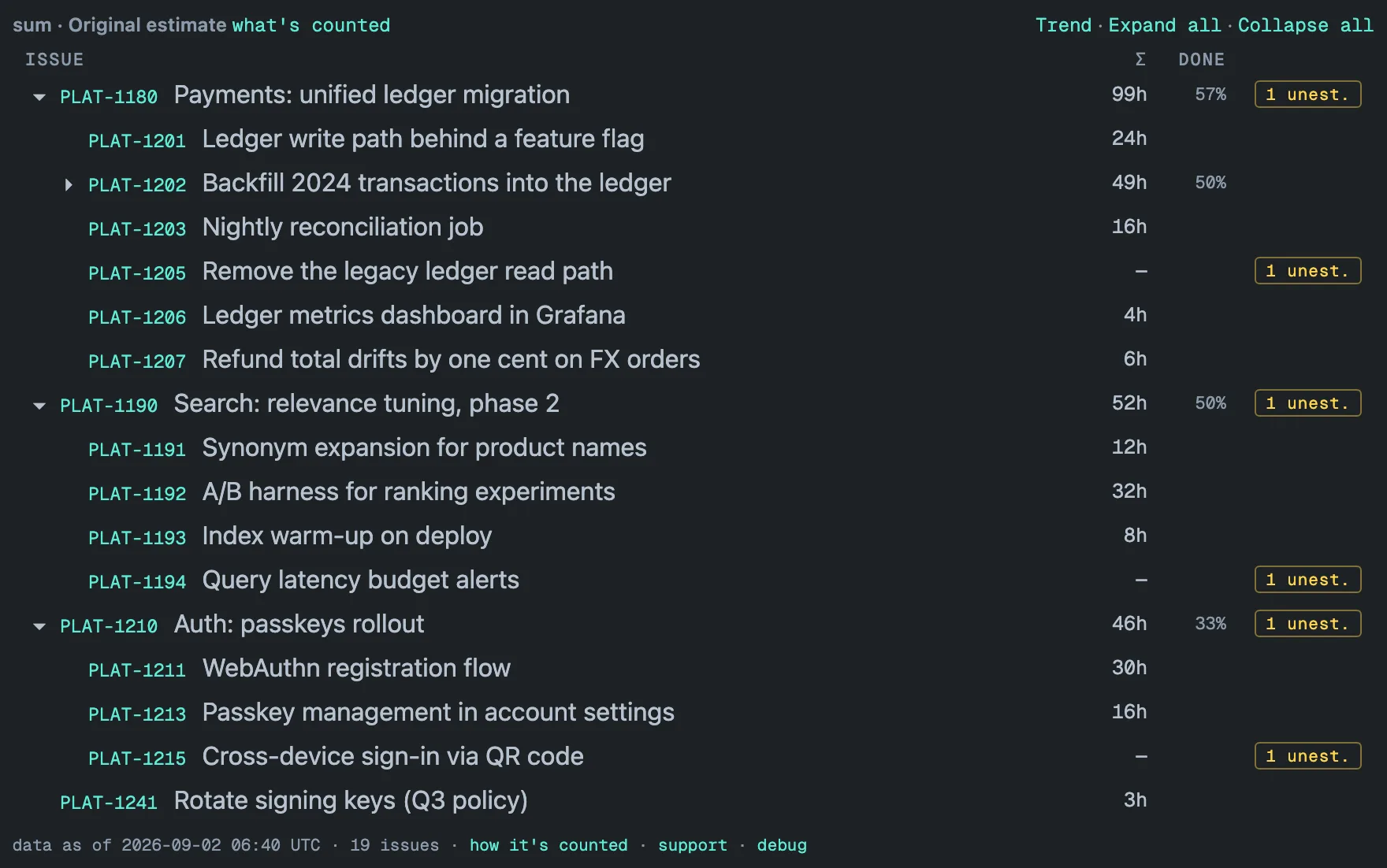
What that means for the three fields specifically:
- Hours, not seconds. Jira hands the gadget seconds; the Σ column shows
hours with an
hsuffix and up to two decimals —99h,12.5h— in your Jira locale. - Any depth, not one level. An epic’s 99h includes the sub-tasks of its stories, and a level above the epic sums its epics the same way. A story in another selected project still counts toward its epic.
- Remaining estimate that excludes finished work. Tick Open work only
and the rollup drops the value of every issue whose status category is
Done — a finished parent with open children stays as a row so its children
keep their place — the same rule as the JQL
statusCategory != Done— so a closed story’s leftover4hno longer inflates the epic. The DONE column keeps showing the share of the work under each row that is done, on every row that still has open work listed under it. - Missing values stay visible. A story with no original estimate shows
—and adds to the amber unest. badge on every row above it; with Time spent selected, the badge counts issues with no work logged at all. Click the badge and the tree narrows to those branches.
Three configurations cover most questions:
| Question | Field · operation · setting |
|---|---|
| How many hours has each epic consumed? | Time spent · sum |
| How many hours are left per epic? | Remaining estimate · sum · Open work only |
| Was the plan realistic? | Two gadgets on one dashboard: Original estimate · sum next to Time spent · sum, same projects |
The totals are computed before you open the dashboard: a background sync keeps a stored copy of every configured project inside your Atlassian site, re-reads it in full once a day with an hourly update in between, and the tile reads the stored result — a 31,000-issue portfolio renders in about a second and a half. The footer carries a “data as of” stamp, and because the totals are captured every day the gadget can draw a trend per project — for Time spent, a line that shows how fast the hours accumulate. Every viewer sees only what their Jira permissions allow, and the data stays inside your Atlassian site with no external servers. The gadget is free on Jira sites with up to 10 users. How rollups work writes down the counting rules, and the hierarchy guide explains why the parent field, not issue links, is the right thing to follow.
[ questions ]
▸Does Jira add up Time spent from stories to their epic?
From its stories, yes; not from their sub-tasks. Hours logged on a sub-task reach its story and stop there — Atlassian's own note on JRACLOUD-70150 (open since 2018) puts the roll-up at one level, and the request asks for it to reach the epic as well.
▸What is the difference between Time Spent and Σ Time Spent in Jira?
Time Spent is what was logged on that work item itself. Σ Time Spent adds its child work items, as Atlassian defines it; the epic case is the one JRACLOUD-70150 is about. The same Σ columns exist for Original estimate and Remaining estimate, and you can add them to the issue navigator or the Filter Results gadget — but the navigator lists rows and offers no column total.
▸Can a Jira dashboard gadget sum Remaining estimate per epic?
Not a built-in one. Two Dimensional Filter Statistics, Work item statistics and Pie chart count work items grouped by a field, and the Workload pie chart splits one filter's time by a field with no hierarchy. Hierarchy Totals is a dashboard gadget that sums Original estimate, Remaining estimate or Time spent up the parent chain to the epic and any level above, shown in hours.
▸Do I need Jira Premium to roll up time estimates to epics?
Roll-ups in Plans are a Jira Cloud Premium and Enterprise feature; they show remaining work inside the plan, not Time spent, and not on a dashboard. Hierarchy Totals reads Jira's parent field directly — sub-task, story, epic and any Advanced Roadmaps level above when your site has one — so it does not depend on a plan being configured.