[ comparison · published 2026-08-26 · updated 2026-09-20 ]
Hierarchy Totals vs Rich Filters for Jira (2026)
Hierarchy Totals · by Claused — compared with Rich Filters on the Atlassian Marketplace ↗ · written by Andrey Pavlov
Short version: Rich Filters is a mature, well-liked dashboard suite — interactive filter panels and many gadget types. Hierarchy Totals is a focused gadget that does one thing — hierarchy rollups of numeric fields — built for large Jira sites. Which one you need depends on which problem you have.
Disclosure
We make Hierarchy Totals, so read this the way you would read any vendor’s comparison. Every statement about Rich Filters below comes from public information — its Marketplace listing and public reviews, quoted with dates and checked on 2026-09-02 — and we say plainly where Rich Filters is the better choice.
What each product is
Rich Filters (by Appfire; 9,400+ installs, rated ★4.8 across 184 reviews on the Marketplace, checked on 2026-09-02) adds interactive filter controls to Jira dashboards and a family of gadgets driven by them. It is a power tool for building rich, clickable dashboards on top of saved filters, and its listing carries Atlassian’s Cloud Fortified badge.
Hierarchy Totals is one gadget with one job: roll a numeric field — story points, estimates, time — up Jira’s issue hierarchy (sub-task → story → epic → any Advanced Roadmaps level above) for up to 50 projects in one tile. It offers sum, average, min, max, count and a median over the full distribution; an Open work only mode; the share of the work under each row that is done; an amber badge counting unestimated leaves; a daily trend of the totals; and drill-down — expand any row, or show only the branches that still have unestimated work. It is on the Atlassian Marketplace; the docs describe the shipped build.
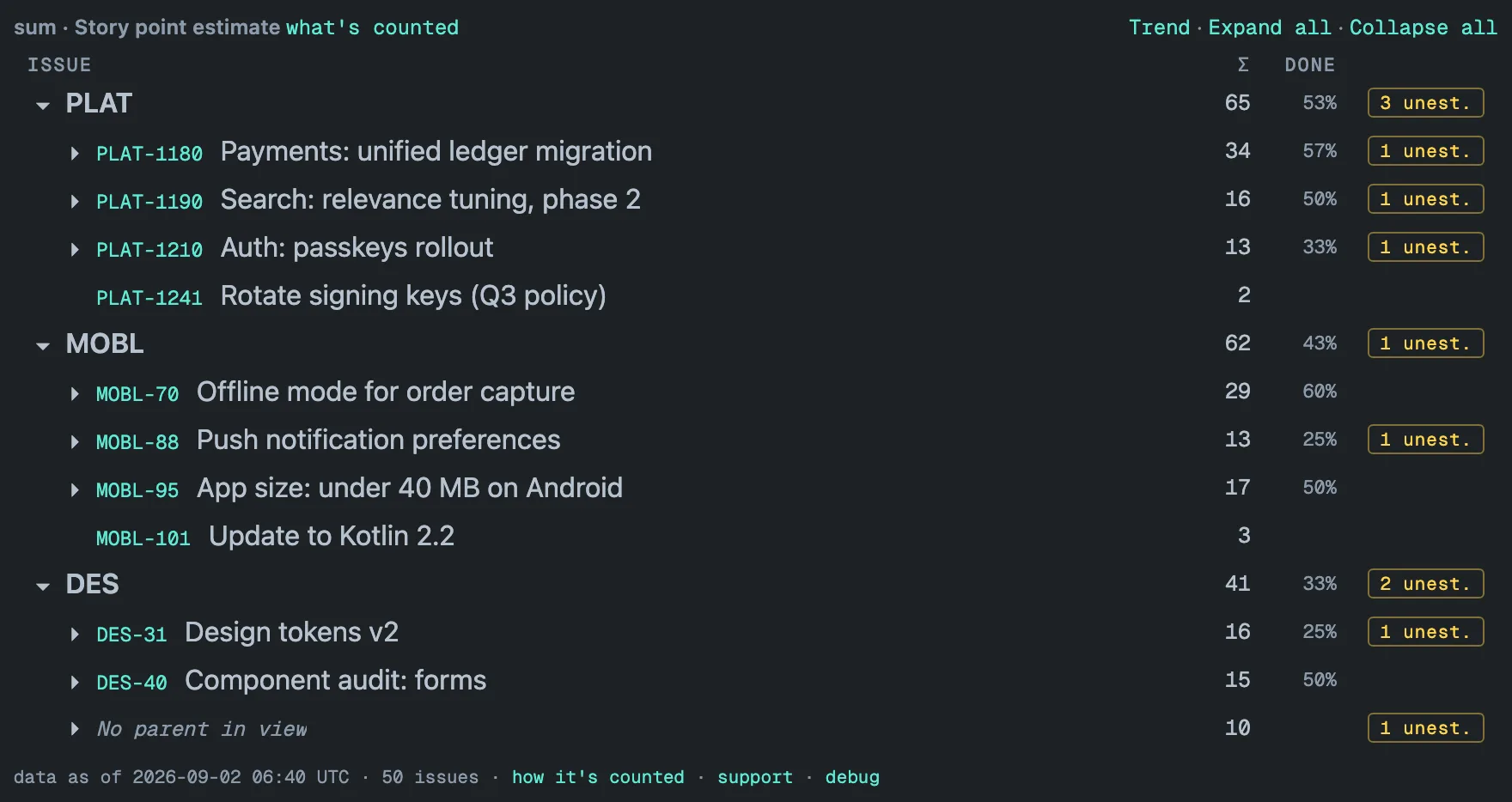
If your problem is “I want a wall of interactive charts,” look at Rich Filters. If your problem is “I need trustworthy totals over a large hierarchy,” keep reading.
Where the computing happens
Rich Filters works from Jira’s live data: its listing describes “real-time data” and a statistics engine “supporting dashboards with tens of thousands of issues” (checked on 2026-09-02), and its privacy tab lists only configuration data as stored — so the issues behind a gadget are fetched and computed when the dashboard opens. One public review from April 2026 (★3) reports “massive performance issues” with large filters containing thousands of tickets; your mileage will depend on filter size.
Hierarchy Totals starts from the opposite premise: the work happens before you open the dashboard. A background sync keeps a stored copy of every configured project inside your Jira site — Atlassian-hosted storage attached to the site — re-reads it in full once a day and patches it hourly. Opening the dashboard reads that copy and draws it. We know the alternative first-hand: Forge, the Atlassian platform the gadget is built on, enforces a 25-second limit per render, and we ran into it on a project of more than 30,000 issues before moving the work out of the render.
Two practical consequences:
- Scale. A 31,000-issue portfolio renders in about a second and a half; 13 projects and 47,000 issues render in under three seconds. Both are render times of a stored snapshot, and the time is driven mainly by how many issues the gadget covers.
- A visible date instead of a spinner. The stored copy is usually less than an hour old (deleted or moved issues are picked up by the daily full re-read), so every render carries a “data as of” stamp in the footer, and the tile warns when its numbers are more than 48 hours old. While the first background pass runs — minutes on a small site, an hour or more on a large one — the tile shows a bounded live preview, labeled as one in the footer, and replaces it with the complete numbers on its own.
Details in Freshness & performance and on the limits page.
Trend history
Because the totals are stored, the daily full re-read also keeps one point per project per day, and the tile draws them on demand — no report to schedule, no export to keep.
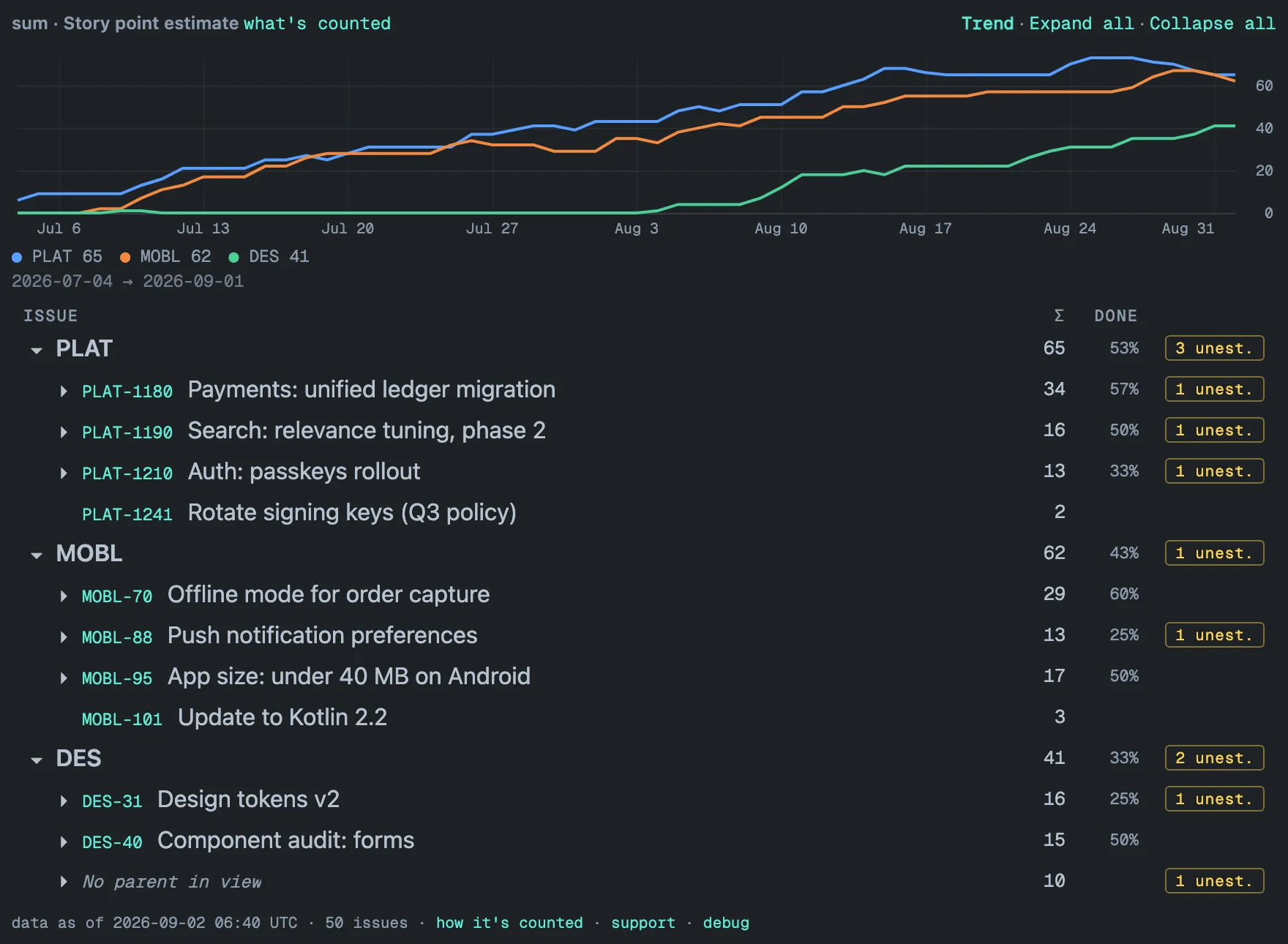
A line appears from the second day; a filtered gadget’s trend starts the day it is configured; and the trend is withheld from a viewer who cannot see the whole configured scope. More in Trends.
Where the data lives
Check any app’s Marketplace privacy tab before installing — security teams will. Rich Filters’ privacy tab lists processing of end-user data outside Atlassian’s infrastructure (checked on 2026-09-02); that is a common and legitimate architecture, but some organizations cannot accept it.
Hierarchy Totals runs on Atlassian’s Forge platform: the stored copy lives in Atlassian-hosted storage attached to your Jira site, the Jira scopes are read-only, there are no external servers and no telemetry, and the app is eligible for Atlassian’s Runs on Atlassian program. Details in Security.
Feature-by-feature
| Rich Filters | Hierarchy Totals | |
|---|---|---|
| Interactive filter panels | Yes — its core strength | No |
| Sum of story points or a number field over a flat filter | Yes — sum-up tables on issue count, story points, time tracking or any other number field (listing, checked 2026-09-02) | Yes, within the hierarchy tree, via an inline JQL filter |
| JQL filtering of the rollup | Via saved filters | Yes — an inline filter of up to 500 characters that keeps the tree structure, with its own trend |
| Many gadget and chart types | Yes | One gadget, one job |
| Hierarchy rollup (sub-task → story → epic → levels above, via Jira’s parent field) | Not advertised | Yes — its core strength |
| Cross-project totals in one view | Via filters | Yes — up to 50 projects, a bold total row per project |
| Median over the full distribution | Not advertised | Yes |
| Unestimated work surfaced | Not advertised | Yes — an amber “N unest.” badge per subtree, one click to show only those branches |
| Trend history of totals | Not advertised | Yes — one point per project per day |
| Performance at 10,000+ issues | Computes when the dashboard opens; listing claims tens of thousands of issues, one ★3 review (April 2026) reports performance issues at thousands (checked 2026-09-02) | Stored snapshot: 31,000 issues in ~1.5 s, 47,000 in under 3 s |
| Data stays inside your Jira site | Privacy tab lists external processing (checked 2026-09-02) | Yes — Atlassian-hosted storage, read-only scopes, no external servers |
| Atlassian trust programs | Cloud Fortified badge on the listing (checked 2026-09-02) | Eligible for Runs on Atlassian; the badge itself is granted at listing |
| Maturity, install base, reviews | 9,400+ installs, ★4.8 across 184 reviews (checked 2026-09-02) | On the Atlassian Marketplace since 2026-09-17 — judge us by the changelog and roadmap |
Using Hierarchy Totals as a Rich Filters alternative — and when not to
If you searched for a Rich Filters alternative, be precise about which part you want to replace. Rich Filters sums story points and other number fields today — its listing, checked on 2026-09-02, describes sum-up tables that base values “on issue count, story points, time tracking or any other number field”, computed from live data over saved filters, next to interactive quick filters and many chart gadgets. Hierarchy Totals replaces none of the interactive dashboard. It replaces one number: the total of a numeric field over a hierarchy, computed ahead of time.
That makes it a reasonable alternative in three situations:
- The number you need is a hierarchy total. A program’s remaining story points through sub-task → story → epic → initiative, across up to 50 projects, with a bold row per project — Rich Filters sums flat filter results and does not advertise following the parent field, so you would be rebuilding the hierarchy in saved filters by hand.
- The dashboard has become slow at tens of thousands of issues. The gadget reads a stored copy — 31,000 issues in about 1.5 seconds, 47,000 issues across 13 projects in under 3 seconds — and the price is written on the tile: a “data as of” stamp, numbers patched hourly and re-read in full once a day, never live.
- Security review wants the data to stay inside the Atlassian site. Read-only scopes, no external servers, no telemetry, Forge-hosted storage and eligibility for Runs on Atlassian; Rich Filters’ privacy tab lists external processing, which some organizations cannot accept.
And three situations where it is the wrong swap:
- You want viewers to filter interactively — by assignee, sprint or component, clicking rather than editing a gadget. Hierarchy Totals has a JQL filter of up to 500 characters set by whoever configures the gadget, and no filter panels. Keep Rich Filters, or run both.
- You need live numbers the minute an issue changes. The gadget’s numbers are at best an hour old, and deleted or moved issues are only removed by the daily full re-read; the tile says how old its data is rather than hiding it.
- You need charts, exports or scheduled reports. Hierarchy Totals is a tree with totals, a DONE column and a trend line — no export, no API, no scheduled report — and it sums number-type custom fields plus Original estimate, Time spent and Remaining estimate, nothing else.
If your dashboard already runs on Rich Filters and the only thing missing is a hierarchy total, adding one Hierarchy Totals tile is a smaller change than replacing the suite. The guide how to sum story points across epics in Jira covers what Jira does natively before either app.
When Rich Filters is the right call
Choose it when you need interactive, audience-facing dashboards with many chart types and dynamic filtering; try it on a filter the size of yours first. It is a good product with a long track record — that is precisely why it is the comparison worth making.
Choose Hierarchy Totals when the number you need is a total over a hierarchy — a program’s remaining story points, a portfolio’s effort across four projects — and you want it rendered from a stored copy rather than computed while you wait, dated on screen, with unestimated work counted rather than hidden, and kept inside your Jira site. Start with Getting started; questions go to the FAQ or to support.
[ questions ]
▸Is Hierarchy Totals a Rich Filters alternative?
For one job, yes: when the number you need is a total of story points, estimates or time rolled up through Jira's hierarchy, across up to 50 projects, on a dashboard. It does not replace Rich Filters' interactive quick filters or its many chart gadgets, and nothing stops the two from sitting on the same dashboard.
▸Can Rich Filters sum story points?
Yes. Its Marketplace listing, checked on 2026-09-02, describes sum-up tables that base values on issue count, story points, time tracking or any other number field, computed from live Jira data over a filter. What the listing does not advertise is following the parent field through the hierarchy — that is what Hierarchy Totals does, from a stored copy of the issues.
▸Does Hierarchy Totals need Rich Filters or Jira Premium?
Neither. It is a standalone Jira Cloud dashboard gadget with its own inline JQL filter of up to 500 characters, it reads the parent field rather than Plans, and it is free on Jira sites with up to 10 users, with paid tiers billed through the Atlassian Marketplace once the listing is published.