Getting started
updated 2026-09-20
Before you start
- Jira Cloud only. Hierarchy Totals is built on Atlassian Forge and runs inside your Jira Cloud site. There is no Data Center or Server version.
- A Jira admin installs the app once for the whole site.
- Anyone who can edit a dashboard can add the gadget and configure it.
- The first time each person views the gadget, Jira shows a one-time Allow access consent screen (if the tile asks instead, its button says Grant access). It is a read-only grant that lets the app read Jira as that viewer — which is how every viewer sees only the projects they can browse and the issues their issue security allows. Projects a viewer cannot browse are reported as hidden, never shown. See Security and the FAQ.
Install
Hierarchy Totals is on the Atlassian Marketplace.
- A Jira admin installs the app from the Marketplace listing.
- Open a dashboard, choose Add gadget, search for Hierarchy Totals and add it.
- On first view, approve the Allow access request, then open the gadget’s settings: with the dashboard in edit mode, open the ⋯ menu on the tile → Configure.
A dashboard can hold several Hierarchy Totals gadgets, each with its own projects, field and filter.
The same install adds a second gadget, Hierarchy Progress — percent complete by issue count and by story points. Search for it in Add gadget the same way; it has a page of its own.
Configure the gadget
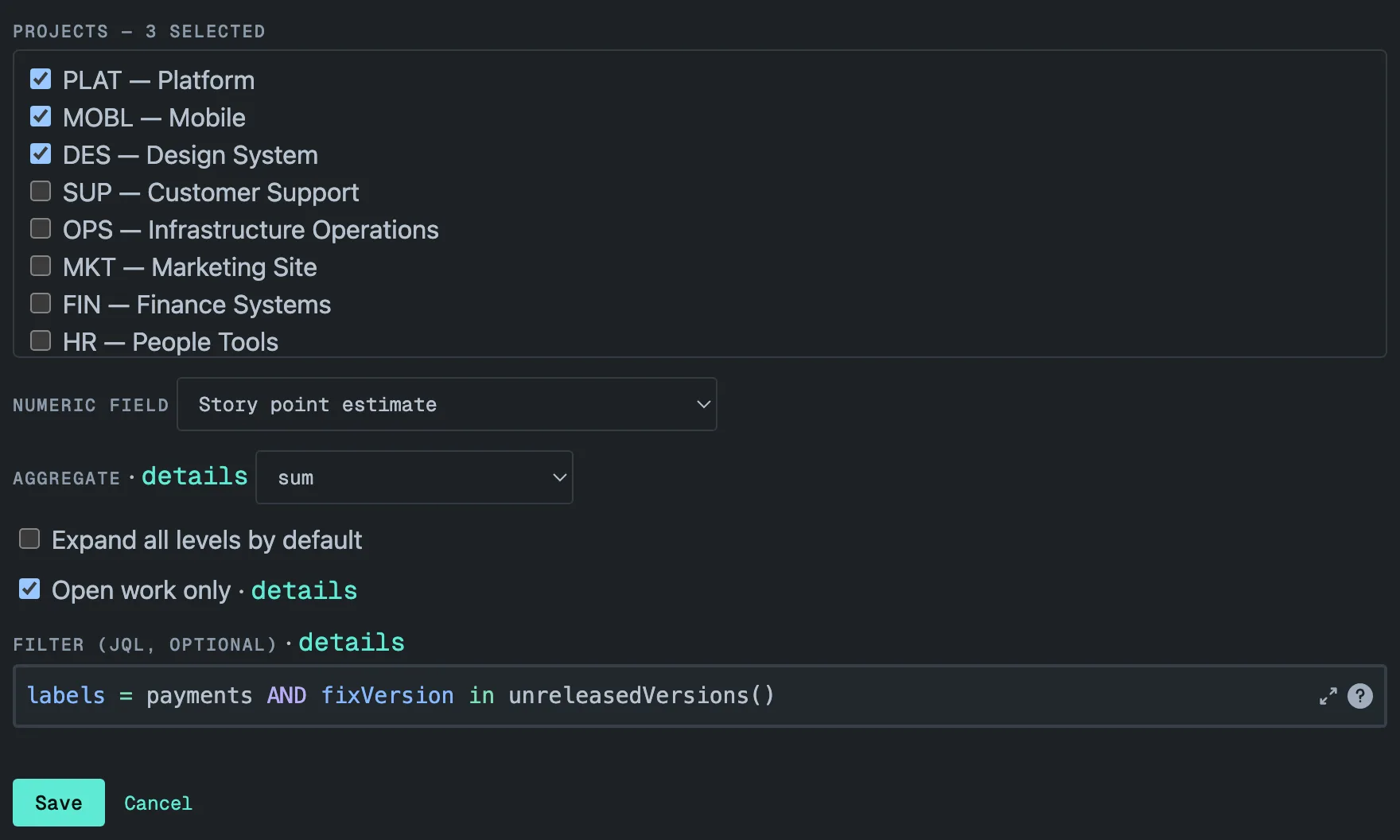
The controls, in the order they appear. On screen each is a single line; details beside a control opens its explanation.
- Projects — pick up to 50. The list stops accepting more at 50. With two or more projects the tile shows one bold summary row per project. Past eight, a hint appears: totals stay exact at any size, but a dashboard tile gets crowded with one summary row and one trend line per project, and a JQL filter across many projects usually reads better than more checkboxes.
- Numeric field — number-type custom fields (Story point estimate, Story Points, business value, your own number fields) plus three time-tracking fields: Original estimate, Time spent and Remaining estimate, shown in hours. Story Points or Story point estimate is preselected when your site has one.
- Aggregate — sum, avg, min, max, count or median. Every row aggregates the issue itself together with everything below it, so an epic that carries its own estimate adds it to its children’s. Median is taken over all values in the subtree, not over sub-totals. See How rollups work.
- Expand all levels by default — start with the whole tree open. Without it, the top-level rows start open one level — each epic shows its stories, or each project row its epics — and everything deeper stays collapsed.
- Open work only — excludes issues whose status category is Done, so
totals mean remaining work. Cancelled, Rejected and Won’t Do count as Done,
not just a status named “Done” — the same as the JQL
statusCategory != Done. A Done epic whose children are still open stays in the tree as a container for them. - Filter (JQL, optional) — up to 500 characters, written in Jira’s own
JQL editor with autocomplete. It applies on top of the selected projects
and runs with the viewer’s permissions. A trailing
ORDER BYhas no effect. The trend of a filtered gadget starts collecting the day it is configured. See Filtering with JQL.
Save becomes available once at least one project and a field are chosen and the filter is within 500 characters.
Live preview
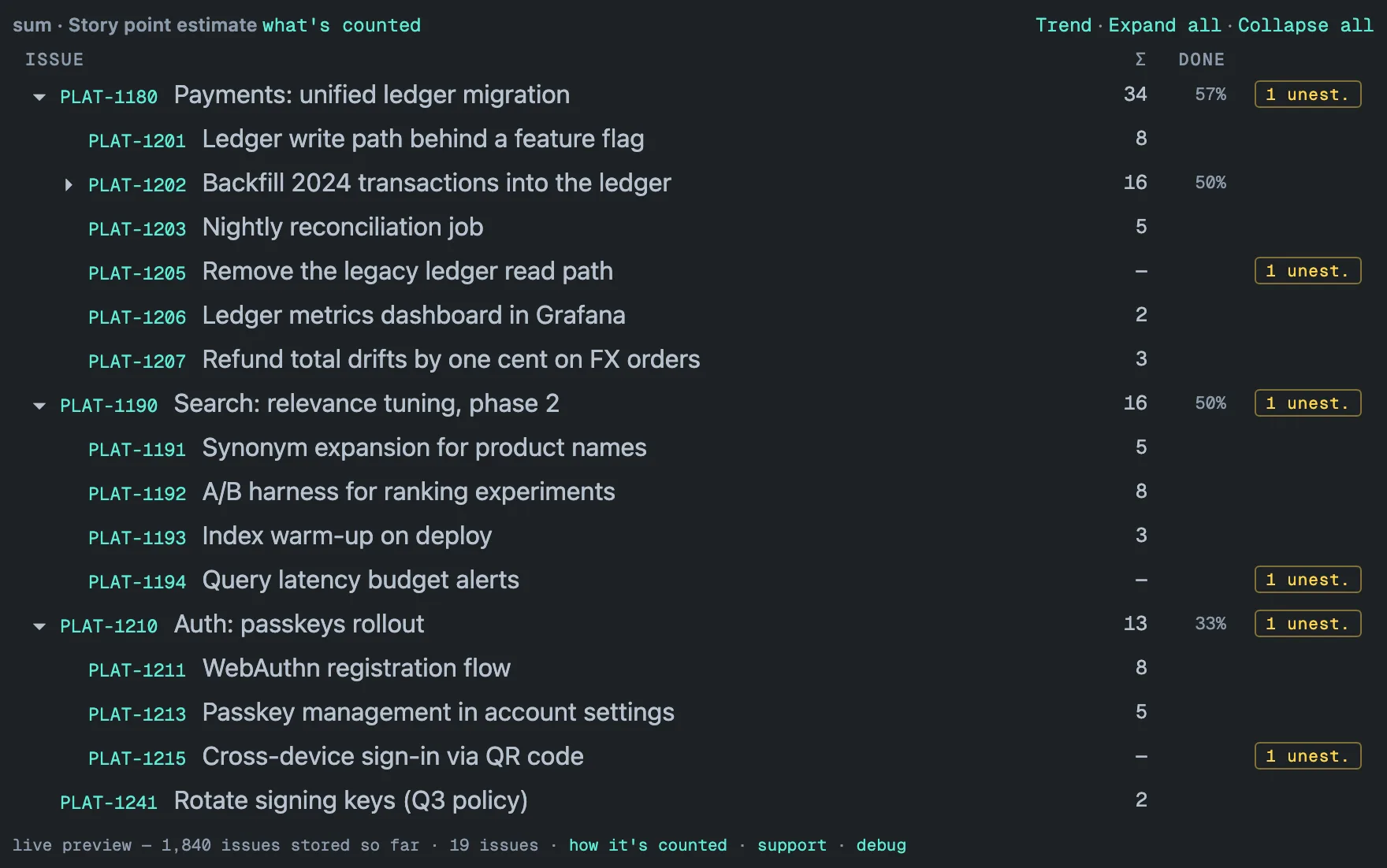
The complete numbers come from a stored snapshot that the app builds and keeps up to date in the background. The first render after you save starts that first pass. Until it finishes, the tile shows a live preview: it reads up to about 500 issues straight from Jira at render time, oldest first.
The footer starts with live preview: it says the background sync is
running, or, for a Jira admin, how many issues it has stored so far.
How it’s counted opens the full sentence, and partial: not all data loaded yet when the preview stopped before the end of the data.
A preview is not a lower bound. It covers the oldest few hundred issues, so the complete numbers may be higher or lower.
You do not have to do anything. While the first pass runs, the tile re-reads
itself — every 90 seconds, less often when Jira’s hourly request budget for
the app is running low — and replaces the preview with the complete numbers
on its own; the footer then changes to data as of … UTC. This holds from
the very first render of a new gadget.
If the first pass hit an error, or has not started yet, the tile does not re-read itself. The footer names that state, and how it’s counted says to reload the dashboard once the pass has run.
The tile also stops when its own refreshes keep failing. Each failed
refresh doubles the wait before the next one — from the usual 90 seconds to
3, 6, 12 and at most 15 minutes — and after five failures in a row the tile
stops asking. The footer then reads
live preview — stopped refreshing; reload the dashboard, and how it’s
counted says the same in a full sentence. One refresh that succeeds resets
the count. The background pass is not affected; only the tile stopped
asking.
The first pass takes minutes on a small site and an hour or more on a large one. A gadget over more than seven projects starts its background reads seven projects at a time, fourteen minutes apart, to stay inside Jira’s rate limits — with 50 projects the last group starts about an hour and forty minutes after the first. The tile keeps re-reading itself through the whole first pass, between those groups too. After that, every configured project is re-read in full once a day and patched hourly — see Freshness and performance.
Reading the gadget
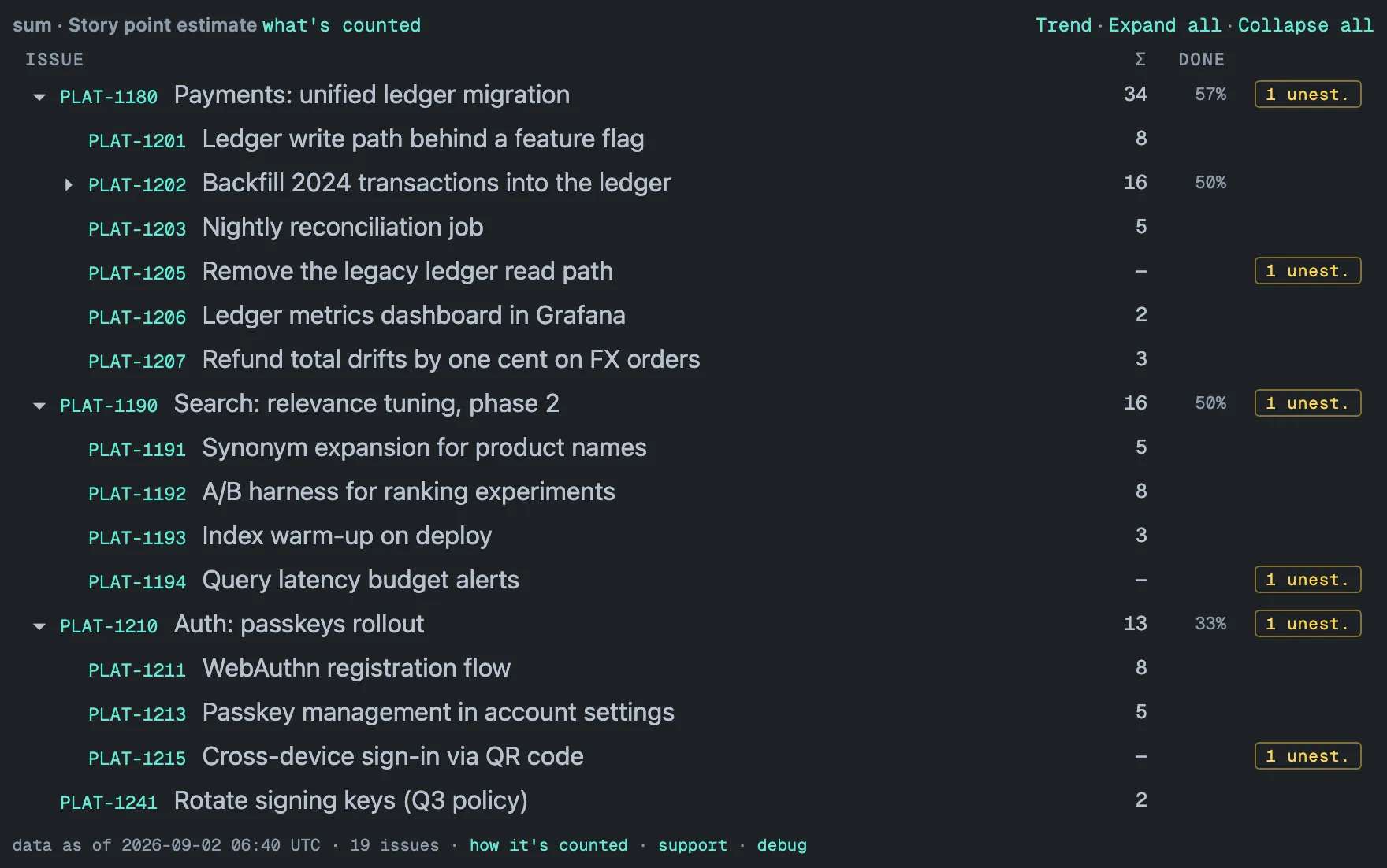
- Header line — what you configured: the operation and the field
(
sum · Story point estimate), then· open onlywhen Open work only is on and· filteredwhen a JQL filter is set. What’s counted opens the exact query behind the totals, with a Run it in Jira link. - Toolbar — Trend opens the history of the configured total — one line per project, or a single line for a filtered gadget (Trends). Expand all and Collapse all open or close the whole tree.
- Rows — issue keys are links that open the issue in Jira; ▸ and ▾ expand and collapse. In a multi-project gadget the tree starts with one bold row per project. The hierarchy is Jira’s parent field: sub-task → story → epic → any level above it; issue links are not followed.
- The Σ column — the aggregate for that row’s entire subtree, the row’s own value included. An em dash means the issue has no value in the field. Time-tracking fields display in hours.
- The DONE column — the share of the work items under the row that are done. A work item is an issue with nothing below it — a sub-task, or a story without sub-tasks; an epic or a story with sub-tasks is not counted itself, its work is. It is counted over every status, even when Open work only is on. A JQL filter does narrow it: the share is then taken over the issues the filter matched, so the same epic can read 57 % in the full tree and 50 % under a filter. Hover the header for the rule. It hides on tiles narrower than 520 px.
- unest. badge —
N unest., in amber, on rows whose subtree contains issues with no value in the field; it counts only issues at the bottom of the tree — an epic with no estimate of its own is not counted, only its unestimated children are. On a row with children it is a button: click it to see only the unestimated branches (Drill-down). On a single issue it is information. It does not appear under count. - Footer — one line:
data as of … UTCis when the stored snapshot was taken, then the issue count. How it’s counted opens the rule behind the numbers and everything the table does not show:N outside hierarchywhen issues have a parent the gadget cannot see, andpartialwhen a read stopped short. support opens the contact form. debug copies a diagnostic block for support tickets — it names no issue keys, summaries or JQL. - Column headers stay in place while a long table scrolls under them.
Notices above the table appear only when something needs attention: an amber one when the numbers are older than 48 hours or a project is no longer reachable in Jira, a grey one when a project is hidden from the viewer. Each one says what to do.
Where next
- Delivery lead wants one total for work spread across projects — three projects, one gadget, one screen.
- How rollups work — the six operations, unestimated issues, dirty hierarchies and the DONE column.
- Hierarchy Progress — the second gadget: percent complete by issue count and by story points, what is left, and a trend of each project’s percentage.
- Filtering with JQL — slicing by sprint, version, label or component.
- Drill-down — from a number to the issues behind it.
- Limits — every number you can bump into, in one place.