[ guide · published 2026-09-02 · updated 2026-09-20 ]
Sum story points to an epic with Jira Automation
by Andrey Pavlov · Claused
Short answer: Jira Cloud does not add up story points to an epic on its own. Jira Automation can: a rule fires when a story’s points change, looks up the epic’s other children, sums them with a smart value and writes the number into a field on the epic. It works — for one hierarchy level per rule, only when something triggers it, inside one project unless a Jira admin makes it global, and within a monthly allowance of automation steps. This guide gives the rule exactly as Atlassian documents it, then walks through where it breaks and what to use instead. For every other native way to total points, see how to sum story points across epics and projects.
The rule, as Atlassian documents it
Two versions exist in Atlassian’s own material. They differ in one thing: how the rule finds the children.
Sub-tasks → parent: the template
Atlassian ships this one as the template “Sum up story points and keep parent and subtask in sync”:
- Trigger — Field value changed, watching Story Points (or Story point estimate in a team-managed project).
- Condition — Work item fields: issue type is Sub-task.
- Branch — Related work items → Parent.
- Action — Edit work item: set the parent’s Story Points to
{{issue.subtasks.Story Points.sum}}.
issue.subtasks is a list, and lists carry the functions .sum,
.average, .min, .max and .size — that is the whole of the math
here, documented on Atlassian’s
smart values for lists
page, whose own example is this exact expression. Note what the template
does to the story: it overwrites the story’s own estimate with the
sub-task total. That is the intended “keep in sync” behaviour, and it is
the moment to decide which level of your hierarchy carries estimates.
Stories → epic: the knowledge-base rule
Sub-tasks are special: an issue knows its sub-tasks directly. An epic does not know its stories the same way, so the second version has to search for them. Atlassian’s knowledge-base article “Sum up story points and display value in parent work item” (last updated 2025-09-26) builds it like this:
- Trigger — Multiple work item events: Work item created and Work item updated. (A Field value changed trigger watching Story Points and Parent fires less often and costs fewer steps — see limits below.)
- Conditions: issue type is Story; JQL
"parent" != EMPTY. - Action — Lookup work items: JQL
"parent" = {{triggerIssue.parent}}. - Branch — Related work items → Parent.
- Action — Edit work item: set a number-type custom field on the
epic to
{{lookupIssues.Story Points.sum}}.
Two details in that article are easy to skim past and matter later. The target is not the epic’s own Story Points field but a separate number field the article calls “Story Points of all linked stories”, added to the epic’s screens. And the Lookup work items action returns at most 100 work items.
Variants: append AND status = "In Progress" or AND status = Done to
the lookup and write into two more fields, and the epic shows open,
in-progress and done points side by side. Each variant is another rule or
another lookup — that is, more steps.
Where it breaks
Everything below is a property of how Automation works, not a bug. The rule is fine; the model is event-driven, single-level and single-project unless you pay in admin rights and steps.
1. It recalculates only when it fires
A rule runs when its trigger event happens to one issue, and recomputes one epic — that issue’s current parent. Consequences:
- Nothing is backfilled. Epics whose stories were estimated before the rule existed show nothing until each story is edited once. Teams end up doing a bulk “touch” edit to prime the field.
- Moves leave the old epic stale. Drag a story from epic A to epic B: the trigger issue’s parent is now B, so B is recomputed. A keeps showing points it no longer has, until one of A’s remaining stories changes.
- Deletions fire nothing on the siblings. Delete a story and the epic’s number stays put. Automation does have Work item deleted and Work item moved triggers, so a third and fourth rule can catch these cases — each one more rule to write, test and pay steps for.
2. One level per rule
{{issue.subtasks…}} reaches sub-tasks only. A lookup on "parent" = X
reaches direct children only. So sub-task → story → epic is two rules, and
epic → initiative (an Advanced Roadmaps level) is a third. For the chain to
work, the second rule must have
Allow rule trigger
enabled in its rule details; by default an edit made by another rule is
ignored, as a guard against loops.
Once points exist on both stories and sub-tasks, decide which level counts. The template’s approach writes the sub-task sum into the story, so the story’s number is always the sum and the epic rule then sums stories — consistent, but only if no story with sub-tasks also carries an estimate of its own. Mixed estimation double-counts, quietly.
3. The 100-child ceiling
Lookup work items stops at 100. An epic with 130 stories gets the sum of some hundred of them, with no warning on the epic. Large epics are precisely where people want the total.
4. Execution limits: steps, per plan
Atlassian meters automation in steps pooled at the organization level: “every trigger, condition, action, branch, and loop that runs in a flow counts as a step”. Allowances refresh monthly. The Jira figures on that page, checked on 2026-09-02: Free — 150 per subscription; Standard — 400 per user; Premium — 750 per user; Enterprise — 1,000 per user. With extra usage disabled, reaching 100 % stops every flow until the first of the next month; the page notes that extra-usage billing takes effect on 2026-12-03.
Do the arithmetic for the knowledge-base rule. Trigger, two conditions, lookup, branch, edit: six steps per qualifying story edit — and by that definition the trigger and the first condition run, and count, on every created or updated issue in the project, story or not. On Free, 150 steps is about two dozen story edits a month before this rule, and every other rule on the site, stops. On Standard with ten users, 4,000 steps a month is real headroom, but it is shared with everything else you automate.
5. Across projects: a global rule and a Jira admin
A project rule can only touch issues in its own project. When a platform epic collects stories from three teams’ projects, the rule has to be scoped to multiple projects or global. Those rules are created from Settings → System → Global automation and need the Administer Jira global permission — a project admin cannot create them. In many organizations that turns a ten-minute rule into a ticket to the Jira admin team, and every later tweak goes the same way.
6. It writes into a field people also edit
The number lives in a field, and fields are editable. Point the rule at the epic’s own Story Points and every hand-typed estimate is overwritten on the next run — or, if the rule may trigger itself, loops. The knowledge-base article avoids this with a dedicated number field, which is the right call, but that field still looks like any other: nothing tells a viewer it is generated, and sooner or later someone “fixes” it by hand.
7. No history, no explanation
The field holds one number: today’s. Nothing records what the epic totalled
at the start of the quarter. Nothing shows how many stories are still
unestimated — an unestimated story contributes zero to .sum, silently.
And when the rule stops (over the step allowance, over 100 children, field
removed from a screen) the number simply stops changing. The only trace is
the rule’s audit log, which nobody reading the epic will open. That is
usually the real story behind “Jira story points not rolling up to epic”.
When a precomputed gadget is the better fit
Automation is the right tool when the total has to live on the issue — visible on the epic, searchable with JQL, usable on a board card — for one project and one level, with edit volume comfortably inside your step allowance. If instead the question is “what do these epics and projects add up to, on a dashboard”, a rollup gadget sidesteps every failure mode above because it writes nothing: it reads the hierarchy and computes.
Hierarchy Totals is our Jira Cloud dashboard gadget for exactly that, on the Atlassian Marketplace. What it does, in facts:
- Follows Jira’s parent field through every level — sub-task → story → epic → Advanced Roadmaps levels above — with no per-level rules; issue links are not treated as hierarchy. How rollups work writes down the counting rules.
- Up to 50 projects per gadget, a bold summary row per project, and an optional JQL filter of up to 500 characters. Cross-project is a gadget setting, not a global rule.
- Sum, average, min, max, count or median of number-type custom fields, plus Original estimate, Time spent and Remaining estimate, shown in hours.
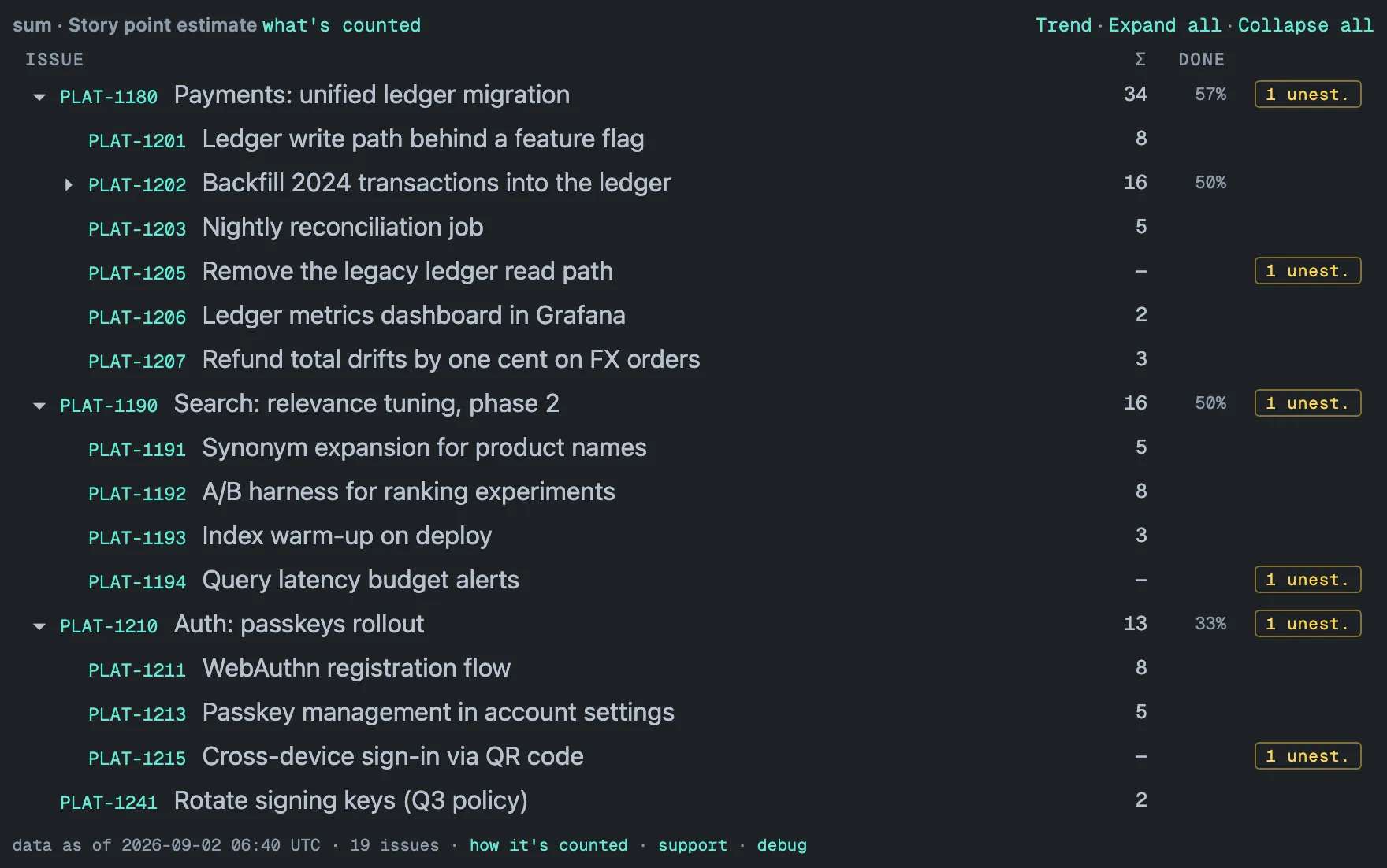
- Unestimated work is counted, not zeroed: an amber unest. badge on each epic that has unestimated work below it, a dash instead of a 0 on the story, and the DONE column showing how much of the work under each epic is done.
- Computed in the background, not on load: every configured project is re-read in full once a day, with an hourly update in between, and the tile reads the stored copy — a 31,000-issue portfolio renders in about 1.5 s. Deleted and moved issues are picked up by the daily full re-read, and the footer’s “data as of” stamp says how fresh the numbers are rather than pretending they are up to the minute. Freshness and performance has the mechanics.
- A trend per project built from the daily captures, from the second day on — the history a field never keeps. See Trends and history.
- Read-only: it never edits an issue, viewers see only what their Browse permission and issue security allow, and the data stays inside your Atlassian site in Forge-hosted storage — no external servers, no telemetry. Free on Jira sites with up to 10 users.
Which one, when
| Situation | Use |
|---|---|
| One project, one level (sub-tasks → story, or stories → epic), modest edit volume | Jira Automation — start from Atlassian’s template |
| The total must sit on the epic itself (JQL, board cards, Plans) | Jira Automation, writing into a dedicated number field |
| Two or more levels, or epics with more than 100 children | A rollup gadget — or one rule per level, with Allow rule trigger on and the 100-item lookup ceiling in mind |
| Stories in several projects rolling into one epic | A gadget spanning the projects, or a global rule from a Jira admin |
| You want to see how the total moved over time | A gadget with a trend; Automation keeps only today’s value |
| Jira Data Center | Automation for Jira — Hierarchy Totals is Jira Cloud only |
If the hierarchy itself is the confusing part — what a parent is, why issue links are not hierarchy, how averages and medians should roll up — the hierarchy guide covers it.
[ questions ]
▸Does Jira automatically sum story points to an epic?
No. Jira Cloud's epic view shows how many child issues are done, not a total of their story points. To put a summed number on the epic you need a Jira Automation rule that writes it into a number field, or a dashboard app that computes the rollup itself.
▸Why are my story points not rolling up to the epic?
The usual causes, in order: the rule only recalculates when a story is created or edited, so stories untouched since the rule was created never fed it; the target field is not on the epic's screen; the epic has more than 100 children and Lookup work items stopped at 100; a second-level rule runs without Allow rule trigger enabled; or the monthly automation step allowance ran out. The rule's audit log names which one.
▸Can one Automation rule roll story points from sub-tasks all the way up to the epic?
No. A rule sees one level: the sub-tasks smart value reaches only sub-tasks, and a lookup on parent = X reaches only direct children. Sub-task to story to epic takes two rules, the second with Allow rule trigger switched on so that the first rule's edit counts as a trigger.
▸Does the rule work across projects?
Only as a multi-project or global rule. A single-project rule cannot edit an epic in another project. Multi-project and global rules are created from Settings, System, Global automation and require the Administer Jira global permission — a project admin cannot set one up.