Filtering with JQL
updated 2026-09-20
What it does
The optional Filter (JQL) field in the gadget settings narrows the rollup to the issues your query matches — on top of the selected projects, never instead of them. The field is Jira’s own JQL editor: syntax highlighting, autocomplete for your fields and values, and validation as you type. Typical uses:
sprint in openSprints()— remaining work in the active sprints;fixVersion = "2.0"— the rollup of one release;labels = platform-migration— one initiative across four projects.
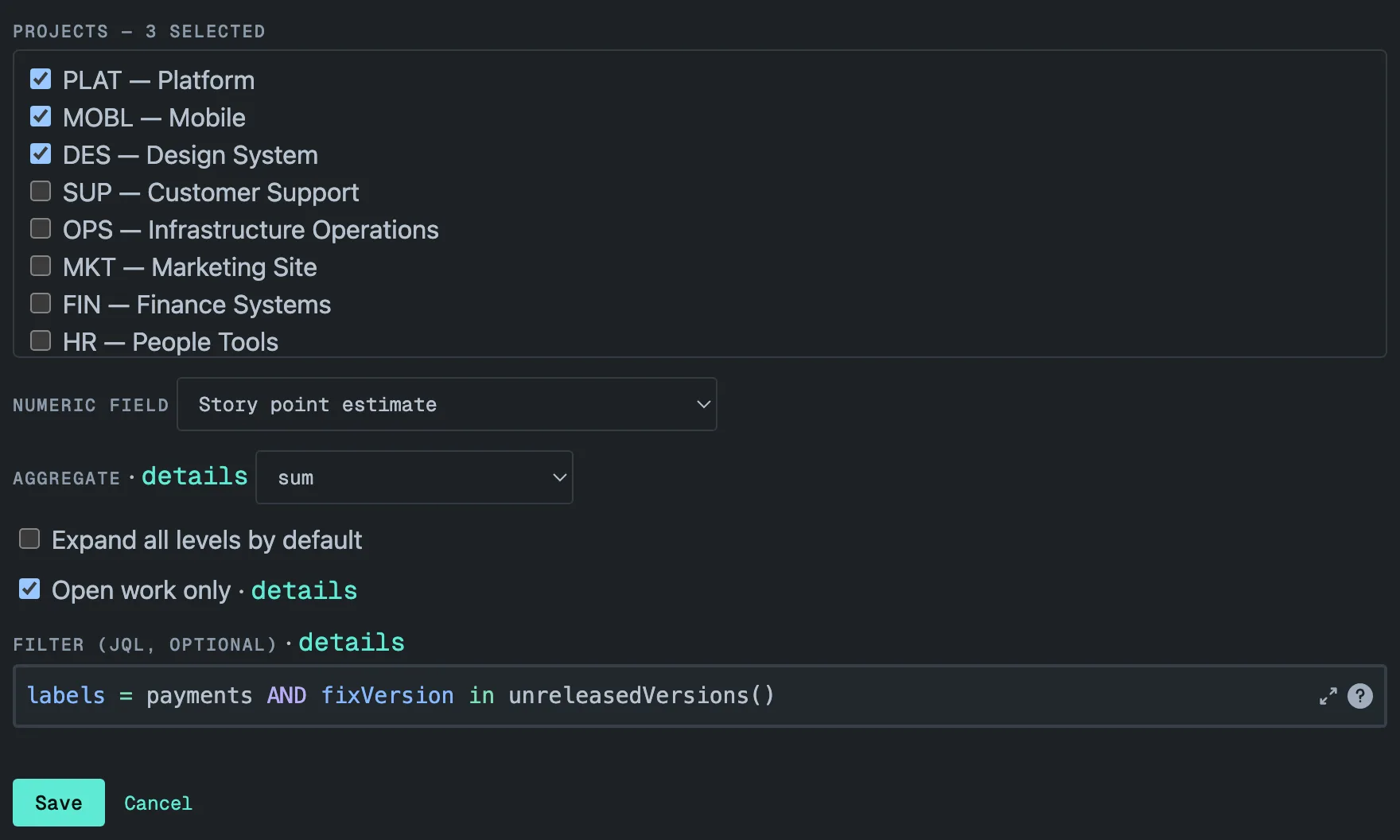
The filter is limited to 500 characters — the settings screen counts
them and will not save a longer one. A trailing ORDER BY is ignored: rows
follow the hierarchy, not your sort. When Open work only is also turned
on, statusCategory != Done is added to your filter.
Issues are filtered, structure is kept
The filter selects issues; the tree keeps its structure. Matched
issues appear under their real epics and parents. An ancestor that does not
match the filter itself is shown as a container with its value stripped, so
totals are computed over the matched set alone — a container outside the
filter adds nothing and is never counted as unestimated. The header shows a
filtered marker so nobody mistakes a slice for the whole. An issue whose
parent is outside the selected projects is listed at the top level of its
project; four or more of them are grouped under No parent in view.
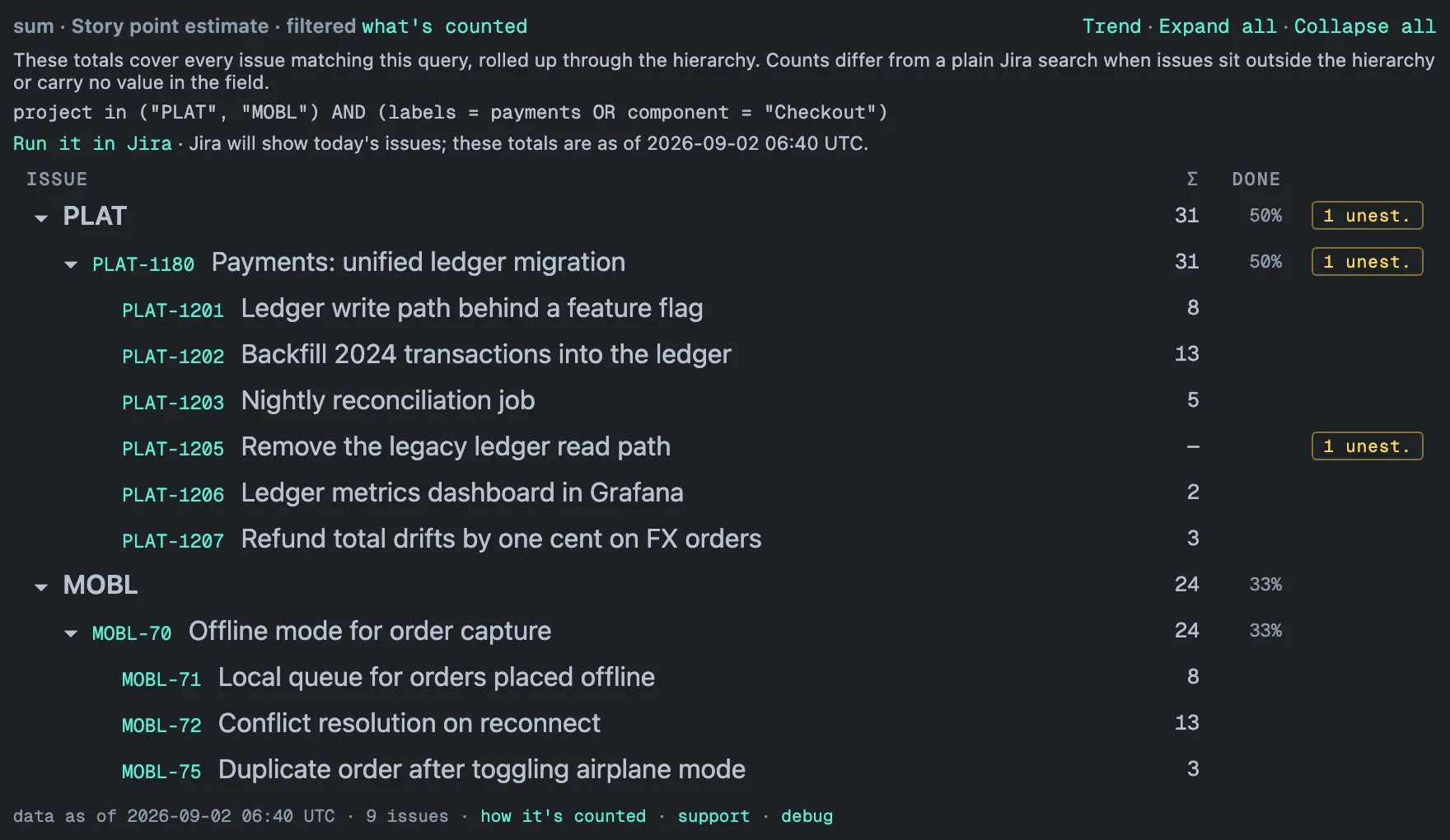
What’s counted
Next to the filtered marker sits a link, what’s counted. It opens a
panel with the exact query behind the numbers — your filter wrapped in the
project clause the gadget adds, plus the open-only clause if that setting
is on — so what you read is what was summed. Run it in Jira opens the
same query in Jira’s issue search.
The two views will not always agree, and the panel says why:
- Hierarchy. Jira lists matching issues flat; the gadget places them under their parents. An epic’s row totals the matching issues beneath it (plus its own value if it matches too), and a matching issue whose parent is not in view is listed on its own rather than in its usual place.
- No value. An issue with no value in the field is part of Jira’s
result but adds nothing to the Σ column; the gadget reports it in the
N unest.badge instead (undercountevery issue counts as one, so no badge is shown). - Time. Jira searches today’s issues; the totals are as of the stored copy, and the panel states that timestamp next to the link.
When the numbers cover only part of the scope — during the live preview on a fresh gadget, or when the filter matches more issues than one render reads — the panel’s first sentence says so instead of claiming completeness.
How it is evaluated
Jira’s search decides, as you and with your permissions, which issues match; their values and their place in the tree come from the stored copy of the selected projects — the speed of the snapshot and the expressiveness of JQL at once. Two viewers with different project access can see different totals from the same gadget, and neither sees an issue Jira would hide from them. If the query is invalid (a typo, a field that does not exist), the gadget says so and shows Jira’s error message instead of quietly rendering something else.
A filter with a parenthesis or a quote that has no pair is refused before it
reaches Jira. The tile shows its filter
error — This filter has a parenthesis or a quote without its pair, so it
cannot be applied. Edit the filter in the gadget settings. — rather than
unfiltered numbers under a filtered header.
The filter error has no retry button: nothing changes until the filter, or the sharing of a saved filter it names, is edited; the panel names both fixes and prints the reason underneath.
A filter can match up to 50,000 issues per query. Above that the what’s
counted panel asks you to narrow the projects or the filter, and how it’s
counted in the footer says partial: above the size cap — a larger match
is flagged, never silently cut to size.
Saved filters
Long or shared queries are better kept as Jira saved filters and
referenced from the gadget: filter = "Payments roadmap", or by id,
filter = 10432. A query may reference up to five saved filters for the
live preview on first render and the trend to work; with more, the tile still works
once the first background pass has finished, but shows no preview and no
trend, and says so.
Two conditions apply:
- The saved filter must be shared with the app — with “Hierarchy Totals”, or with everyone. Otherwise the live preview on first render cannot run it and the trend cannot be captured; the tile says so, and says how to fix it (share the filter, or write its conditions out in the gadget settings). Once the first background pass has finished, the filter runs as the viewer and works regardless. A saved filter that itself points at another saved filter cannot be checked either: no live preview on first render and no trend, though the tile works as the viewer once the first background pass has finished.
- Each viewer needs the saved filter shared with them, as with any JQL in Jira. A viewer without access sees the gadget’s filter error with a hint to ask the filter’s owner.
Filters that depend on who is asking
currentUser() and its relatives — currentLogin(), votedIssues(),
watchedIssues(), projectsWhereUserHasRole(...) and the like — have no
fixed answer: they mean one thing for you and another for a colleague. In
the tile they work as you would expect. The filter runs as the viewer
against the stored data, so “my open work across the portfolio” is a
perfectly good gadget.
Two things are refused, and the tile says so each time: the live preview on first render (the app would have counted its own issues, not yours — reload the dashboard once the first background pass has finished to see the numbers), and trend capture, which runs in the background where there is no viewer to run the filter as.
The filtered trend
A filtered gadget records its own daily history: a single series, labeled Filtered total, the aggregate of exactly the matched issues, starting the day you configure the filter. Editing the filter starts a fresh series — a changed question deserves a changed baseline, and the chart never fakes a past it did not observe. A viewer who cannot browse every configured project sees no filtered trend at all, because that series cannot be re-filtered per viewer. The same goes for a viewer who is outside a security level used in those projects, whatever the filter matches — see Filtered gadgets.
Capture capacity is shared across the site: up to 50 filtered or multi-project series are captured each day, most recently viewed first. A gadget beyond that budget is skipped for the day and says so in its Trend panel; viewing it moves it back into the budget. Per-project history is not counted against it. What each history point holds and how long points are kept is on the Trends page.
Practical notes
- The filter narrows the rollup, not the background sync: the selected projects are still read in full, so changing or clearing the filter needs no re-sync — the next render applies the new query to the same stored copy.
- An empty result explains itself. With Open work only on, the tile says the filter matched nothing among open issues — either nothing matches at all, or everything that matches is in a Done status category. Otherwise it reminds you that the numbers are as of the last sync, so issues created or changed since then are not included yet.
- The DONE column counts work items, and a filter changes what one is: a matched issue whose children did not match is itself the work item, counted once by its own status. The second gadget takes the same filter and the same rule — see Hierarchy Progress.
- Every number a filter can bump into is collected on the limits page.